<?xml version="1.0" encoding="utf-8"?>
<feed xmlns="http://www.w3.org/2005/Atom">

  <title><![CDATA[Paul's Blog]]></title>
  <link href="http://www.paulnorman.ca/atom.xml" rel="self"/>
  <link href="http://www.paulnorman.ca/"/>
  <updated>2025-05-16T13:52:18-07:00</updated>
  <id>http://www.paulnorman.ca/</id>
  <author>
    <name><![CDATA[Paul Norman]]></name>
    
  </author>
  <generator uri="http://octopress.org/">Octopress</generator>

  
  <entry>
    <title type="html"><![CDATA[Minutely Updated Tile Volume: Technical Details]]></title>
    <link href="http://www.paulnorman.ca/blog/2024/01/minutely-updated-tiles/"/>
    <updated>2024-01-15T14:00:00-08:00</updated>
    <id>http://www.paulnorman.ca/blog/2024/01/minutely-updated-tiles</id>
    <content type="html"><![CDATA[<p>I&rsquo;ve been looking at how many tiles are changed when updating OSM data in order to better guide resource estimations, and have completed some benchmarks. This is the technical post with details, I&rsquo;ll be doing a high-level post later.</p>

<p>Software like Tilemaker and Planetiler is great for generating a complete set of tiles, updated about once a day, but they can&rsquo;t handle minutely updates. Most users are fine with daily or slower updates, but OSM.org users are different, and minutely updates are critical for them. All the current minutely ways to generate map tiles involve loading the changes and regenerating tiles when data in them may have changed. I used osm2pgsql, the standard way to load OSM data for rendering, but the results should be applicable to other ways including different schemas.</p>

<!--more-->


<p>Using the Shortbread schemea from <a href="https://github.com/osm2pgsql-dev/osm2pgsql-themepark">osm2pgsql-themepark</a> I loaded the data with osm2pgsql and ran updates. osm2pgsql can output a list of changed tiles (&ldquo;expired tiles&rdquo;) and I did this for zoom 1 to 14 for each update. Because I was running this on real data sometimes an update took longer than 60 seconds to process if it was particularly large, and in this case the next run would combine multiple updates from OSM. Combining multiple updates reduces how much work the server has to do at the cost of less frequent updates, and this has been well documented since <a href="https://www.geofabrik.de/media/2012-09-08-osm2pgsql-performance.pdf">2012</a>, but no one has looked at the impact from combining tiles.</p>

<p>To do this testing I was using a Hezner server with 2x1TB NVMe drives in RAID0, 64GB of RAM, and an Intel i7-8700 @ 3.2 GHz. Osm2pgsql 1.10 was used, the latest version at the time. The version of themepark was equivalent to the <a href="https://github.com/osm2pgsql-dev/osm2pgsql-themepark/commit/e5d39e67ca3447b8c95fa7bb9f78253f404216b4">latest version</a></p>

<p>The updates were run for a week from <a href="https://planet.openstreetmap.org/replication/minute/005/876/694.state.txt">2023-12-30T08:24:00Z</a> to <a href="https://planet.openstreetmap.org/replication/minute/005/908/445.state.txt">2024-01-06T20:31:45Z</a>. There were some interruptions in the updates, but I did an update without expiring tiles after the interruptions so they wouldn&rsquo;t impact the results.</p>

<p>To run the updates I used a simple shell script</p>

<figure class='code'><div class="highlight"><table><tr><td class="gutter"><pre class="line-numbers"><span class='line-number'>1</span>
<span class='line-number'>2</span>
<span class='line-number'>3</span>
<span class='line-number'>4</span>
<span class='line-number'>5</span>
<span class='line-number'>6</span>
<span class='line-number'>7</span>
<span class='line-number'>8</span>
</pre></td><td class='code'><pre><code class=''><span class='line'>#!/bin/bash
</span><span class='line'>set -e
</span><span class='line'>while :
</span><span class='line'>do
</span><span class='line'>SEQUENCE=$(osm2pgsql-replication status -d shortbread --json | jq '.local.sequence')
</span><span class='line'>osm2pgsql-replication update -d shortbread --once -- --expire-tiles=1-14 -o "expire_files/$SEQUENCE.txt"
</span><span class='line'>sleep 60
</span><span class='line'>done</span></code></pre></td></tr></table></div></figure>


<p>Normally I&rsquo;d set up a systemd service and timer as <a href="https://osm2pgsql.org/doc/manual.html#keeping-the-database-up-to-date-with-osm2pgsql-replication">described in the manual</a>, but this setup was an unusual test where I didn&rsquo;t want it to automatically restart.</p>

<p>I then used grep to count the number by zoom in each file, creating lists for each zoom.</p>

<figure class='code'><div class="highlight"><table><tr><td class="gutter"><pre class="line-numbers"><span class='line-number'>1</span>
<span class='line-number'>2</span>
<span class='line-number'>3</span>
</pre></td><td class='code'><pre><code class=''><span class='line'>for z in `seq 1 14`; do
</span><span class='line'>find "$@" -type f -exec grep -Ech "^$z/" {} + &gt;&gt; $z.txt
</span><span class='line'>done</span></code></pre></td></tr></table></div></figure>


<p>This let me use a crude script to get percentiles and the mean, and assemble them into a CSV.</p>

<figure class='code'><div class="highlight"><table><tr><td class="gutter"><pre class="line-numbers"><span class='line-number'>1</span>
<span class='line-number'>2</span>
<span class='line-number'>3</span>
<span class='line-number'>4</span>
<span class='line-number'>5</span>
<span class='line-number'>6</span>
<span class='line-number'>7</span>
<span class='line-number'>8</span>
</pre></td><td class='code'><pre><code class=''><span class='line'>#!/usr/bin/env python3
</span><span class='line'>import numpy
</span><span class='line'>import sys
</span><span class='line'>nums = numpy.fromfile(sys.argv[1], dtype=int, sep=' ')
</span><span class='line'>mean = numpy.mean(nums)
</span><span class='line'>percentiles = numpy.percentile(nums, [0, 1, 5, 25, 50, 75, 95, 99, 100])
</span><span class='line'>numpy.set_printoptions(precision=2, suppress=True, floatmode='fixed')
</span><span class='line'>print(str(mean) + ',' + ','.join([str(p) for p in percentiles]))</span></code></pre></td></tr></table></div></figure>


<p>A look at the percentiles for zoom 14 immediately reveals some outliers, with a mean of 249 tiles, median of 113, p99 of 6854, and p100 of 101824. I was curious what was making this so large and found the p100 was with  sequence number 5880335, which was also the largest diff. This diff was surrounded by normal sized diffs, so it wasn&rsquo;t a lot of data. The data consumed would have been the diff <a href="https://planet.openstreetmap.org/replication/minute/005/880/336.osc.gz">005/880/336</a></p>

<p>A bit of shell magic got me a list of changesets that did something other than add a node: <code>osmium cat 005880336.osc.gz -f opl| egrep -v '^n[[:digit:]]+ v1' | cut -d ' ' -f 4 | sort | uniq | sed 's/c\(.*\)/\1/'</code> Looking at the changesets with <a href="https://nrenner.github.io/achavi">achavi</a>, <a href="https://www.openstreetmap.org/changeset/145229319">145229319</a> stood out as taking some time to load. Two of the nodes modified were information boards that were part of the <a href="https://www.openstreetmap.org/way/281028731">Belarus - Ukraine border</a> and <a href="https://www.openstreetmap.org/way/562094648">Belarus-Russia border</a>. Thus, this changeset changed the Russia, Ukraine, and Belarus polygons. As these are large polygons, only the tiles along the edge were considered dirty, but this is still a lot of tiles!</p>

<p>After validating that the results make sense, I got the following means and percentiles, which may be useful to others.</p>

<p>Tiles per minute, with updates every minute</p>

<table>
<thead>
<tr>
<th style="text-align:right;"> zoom </th>
<th style="text-align:right;"> mean </th>
<th style="text-align:right;"> p0 </th>
<th style="text-align:right;">  p1 </th>
<th style="text-align:right;"> p5 </th>
<th style="text-align:right;"> p25 </th>
<th style="text-align:right;"> p50 </th>
<th style="text-align:right;"> p75 </th>
<th style="text-align:right;">  p95 </th>
<th style="text-align:right;">  p99 </th>
<th style="text-align:right;">   p100 </th>
</tr>
</thead>
<tbody>
<tr>
<td style="text-align:right;">   z1 </td>
<td style="text-align:right;">  3.3 </td>
<td style="text-align:right;">  1 </td>
<td style="text-align:right;">   2 </td>
<td style="text-align:right;">  2 </td>
<td style="text-align:right;">   3 </td>
<td style="text-align:right;">   4 </td>
<td style="text-align:right;">    4 </td>
<td style="text-align:right;">      4 </td>
</tr>
<tr>
<td style="text-align:right;">   z2 </td>
<td style="text-align:right;">  5.1 </td>
<td style="text-align:right;">  1 </td>
<td style="text-align:right;"> 2.6 </td>
<td style="text-align:right;">  3 </td>
<td style="text-align:right;">   4 </td>
<td style="text-align:right;">   5 </td>
<td style="text-align:right;">   6 </td>
<td style="text-align:right;">    7 </td>
<td style="text-align:right;">     10 </td>
</tr>
<tr>
<td style="text-align:right;">   z3 </td>
<td style="text-align:right;">  9.1 </td>
<td style="text-align:right;">  1 </td>
<td style="text-align:right;">   4 </td>
<td style="text-align:right;">  5 </td>
<td style="text-align:right;">   8 </td>
<td style="text-align:right;">   9 </td>
<td style="text-align:right;">  11 </td>
<td style="text-align:right;">   13 </td>
<td style="text-align:right;">   15 </td>
<td style="text-align:right;">     24 </td>
</tr>
<tr>
<td style="text-align:right;">   z4 </td>
<td style="text-align:right;"> 12.8 </td>
<td style="text-align:right;">  1 </td>
<td style="text-align:right;">   5 </td>
<td style="text-align:right;">  7 </td>
<td style="text-align:right;">  10 </td>
<td style="text-align:right;">  12 </td>
<td style="text-align:right;">  15 </td>
<td style="text-align:right;">   20 </td>
<td style="text-align:right;">   24 </td>
<td style="text-align:right;">     52 </td>
</tr>
<tr>
<td style="text-align:right;">   z5 </td>
<td style="text-align:right;"> 17.1 </td>
<td style="text-align:right;">  1 </td>
<td style="text-align:right;">   5 </td>
<td style="text-align:right;">  8 </td>
<td style="text-align:right;">  13 </td>
<td style="text-align:right;">  17 </td>
<td style="text-align:right;">  20 </td>
<td style="text-align:right;">   28 </td>
<td style="text-align:right;">   35 </td>
<td style="text-align:right;">    114 </td>
</tr>
<tr>
<td style="text-align:right;">   z6 </td>
<td style="text-align:right;"> 21.7 </td>
<td style="text-align:right;">  1 </td>
<td style="text-align:right;">   6 </td>
<td style="text-align:right;">  9 </td>
<td style="text-align:right;">  15 </td>
<td style="text-align:right;">  21 </td>
<td style="text-align:right;">  26 </td>
<td style="text-align:right;">   37 </td>
<td style="text-align:right;">   48 </td>
<td style="text-align:right;">    262 </td>
</tr>
<tr>
<td style="text-align:right;">   z7 </td>
<td style="text-align:right;"> 25.6 </td>
<td style="text-align:right;">  1 </td>
<td style="text-align:right;">   6 </td>
<td style="text-align:right;">  9 </td>
<td style="text-align:right;">  17 </td>
<td style="text-align:right;">  24 </td>
<td style="text-align:right;">  31 </td>
<td style="text-align:right;">   46 </td>
<td style="text-align:right;">   63 </td>
<td style="text-align:right;">    591 </td>
</tr>
<tr>
<td style="text-align:right;">   z8 </td>
<td style="text-align:right;"> 29.2 </td>
<td style="text-align:right;">  1 </td>
<td style="text-align:right;">   6 </td>
<td style="text-align:right;">  9 </td>
<td style="text-align:right;">  17 </td>
<td style="text-align:right;">  26 </td>
<td style="text-align:right;">  34 </td>
<td style="text-align:right;">   55 </td>
<td style="text-align:right;">   92 </td>
<td style="text-align:right;">   1299 </td>
</tr>
<tr>
<td style="text-align:right;">   z9 </td>
<td style="text-align:right;"> 34.5 </td>
<td style="text-align:right;">  1 </td>
<td style="text-align:right;">   6 </td>
<td style="text-align:right;"> 10 </td>
<td style="text-align:right;">  18 </td>
<td style="text-align:right;">  28 </td>
<td style="text-align:right;">  37 </td>
<td style="text-align:right;">   64 </td>
<td style="text-align:right;">  173 </td>
<td style="text-align:right;">   2699 </td>
</tr>
<tr>
<td style="text-align:right;">  z10 </td>
<td style="text-align:right;"> 44.6 </td>
<td style="text-align:right;">  1 </td>
<td style="text-align:right;">   7 </td>
<td style="text-align:right;"> 10 </td>
<td style="text-align:right;">  20 </td>
<td style="text-align:right;">  31 </td>
<td style="text-align:right;">  41 </td>
<td style="text-align:right;">   80 </td>
<td style="text-align:right;">  330 </td>
<td style="text-align:right;">   5588 </td>
</tr>
<tr>
<td style="text-align:right;">  z11 </td>
<td style="text-align:right;"> 65.6 </td>
<td style="text-align:right;">  1 </td>
<td style="text-align:right;">   7 </td>
<td style="text-align:right;"> 12 </td>
<td style="text-align:right;">  23 </td>
<td style="text-align:right;">  35 </td>
<td style="text-align:right;">  49 </td>
<td style="text-align:right;">  125 </td>
<td style="text-align:right;">  668 </td>
<td style="text-align:right;">  11639 </td>
</tr>
<tr>
<td style="text-align:right;">  z12 </td>
<td style="text-align:right;">  111 </td>
<td style="text-align:right;">  1 </td>
<td style="text-align:right;">   8 </td>
<td style="text-align:right;"> 14 </td>
<td style="text-align:right;">  29 </td>
<td style="text-align:right;">  44 </td>
<td style="text-align:right;">  64 </td>
<td style="text-align:right;">  238 </td>
<td style="text-align:right;"> 1409 </td>
<td style="text-align:right;">  24506 </td>
</tr>
<tr>
<td style="text-align:right;">  z13 </td>
<td style="text-align:right;">  215 </td>
<td style="text-align:right;">  1 </td>
<td style="text-align:right;">  10 </td>
<td style="text-align:right;"> 18 </td>
<td style="text-align:right;">  40 </td>
<td style="text-align:right;">  64 </td>
<td style="text-align:right;"> 102 </td>
<td style="text-align:right;">  527 </td>
<td style="text-align:right;"> 3150 </td>
<td style="text-align:right;">  52824 </td>
</tr>
<tr>
<td style="text-align:right;">  z14 </td>
<td style="text-align:right;">  468 </td>
<td style="text-align:right;">  1 </td>
<td style="text-align:right;">  14 </td>
<td style="text-align:right;"> 27 </td>
<td style="text-align:right;">  66 </td>
<td style="text-align:right;"> 113 </td>
<td style="text-align:right;"> 199 </td>
<td style="text-align:right;"> 1224 </td>
<td style="text-align:right;"> 7306 </td>
<td style="text-align:right;"> 119801 </td>
</tr>
</tbody>
</table>


<p>Based on historical OpenStreetMap Carto data the capacity of a rendering server is about 1 req/s per hardware thread. Current performance is slower, but includes The new OSMF general purpose servers are mid-range servers and have 80 threads, so should be able to render about 4800 tiles per second. This means that approximately 95% of the time the server will be able to complete re-rendering tiles within the 60 seconds between updates. A couple of times an hour it will be slower.</p>

<p>As mentioned earlier, when updates take over 60 seconds, multiple updates combine into one and reduce the amount of work to be done. I simulated this by merging every <code>k</code> files together. Contuining the theme of patched-together scripts I did this with a shell script, based on <a href="https://unix.stackexchange.com/questions/665304/merging-every-nth-files-in-a-folder-and-delete-used-one">StackExchange</a></p>

<figure class='code'><div class="highlight"><table><tr><td class="gutter"><pre class="line-numbers"><span class='line-number'>1</span>
<span class='line-number'>2</span>
<span class='line-number'>3</span>
<span class='line-number'>4</span>
<span class='line-number'>5</span>
<span class='line-number'>6</span>
<span class='line-number'>7</span>
<span class='line-number'>8</span>
<span class='line-number'>9</span>
<span class='line-number'>10</span>
<span class='line-number'>11</span>
<span class='line-number'>12</span>
<span class='line-number'>13</span>
<span class='line-number'>14</span>
<span class='line-number'>15</span>
<span class='line-number'>16</span>
<span class='line-number'>17</span>
</pre></td><td class='code'><pre><code class=''><span class='line'>k=2
</span><span class='line'>indir="expire_files_2/"
</span><span class='line'>dir="expire_2_mod$k"
</span><span class='line'>
</span><span class='line'>readarray -td $'\0' files &lt; &lt;(
</span><span class='line'>   for f in ./"$indir"/*.txt; do
</span><span class='line'>       if [[ -f "$f" ]]; then printf '%s\0' "$f"; fi
</span><span class='line'>   done |
</span><span class='line'>       sort -zV
</span><span class='line'>)
</span><span class='line'>
</span><span class='line'>rm -f ./"$dir"/joined-files*.txt
</span><span class='line'>for i in "${!files[@]}"; do
</span><span class='line'>   n=$((i/k+1))
</span><span class='line'>   touch ./"$dir"/joined-files$n.txt
</span><span class='line'>   cat "${files[i]}" ./"$dir"/joined-files$n.txt | sort | uniq &gt; ./"$dir"/joined-files$n.txt
</span><span class='line'>done</span></code></pre></td></tr></table></div></figure>


<p>Running the results through the same process for percentiles generates numbers in tiles per update - but updates are half as often, so in terms of work done per time, all the numbers need to be divided by <code>k</code>. For a few <code>k</code>, here&rsquo;s the results.</p>

<p><code>k=2</code></p>

<table>
<thead>
<tr>
<th style="text-align:right;"> zoom </th>
<th style="text-align:right;"> mean </th>
<th style="text-align:right;">  p0 </th>
<th style="text-align:right;">  p1 </th>
<th style="text-align:right;">  p5 </th>
<th style="text-align:right;">  p25 </th>
<th style="text-align:right;">  p50 </th>
<th style="text-align:right;">  p75 </th>
<th style="text-align:right;">  p95 </th>
<th style="text-align:right;">  p99 </th>
<th style="text-align:right;">  p100 </th>
</tr>
</thead>
<tbody>
<tr>
<td style="text-align:right;">   z1 </td>
<td style="text-align:right;">  1.7 </td>
<td style="text-align:right;"> 0.5 </td>
<td style="text-align:right;">   1 </td>
<td style="text-align:right;">  1.5 </td>
<td style="text-align:right;">    2 </td>
<td style="text-align:right;">     2 </td>
</tr>
<tr>
<td style="text-align:right;">   z2 </td>
<td style="text-align:right;">  2.5 </td>
<td style="text-align:right;"> 0.5 </td>
<td style="text-align:right;">   1 </td>
<td style="text-align:right;"> 1.5 </td>
<td style="text-align:right;">    2 </td>
<td style="text-align:right;">  2.5 </td>
<td style="text-align:right;">    3 </td>
<td style="text-align:right;">  3.5 </td>
<td style="text-align:right;">     5 </td>
</tr>
<tr>
<td style="text-align:right;">   z3 </td>
<td style="text-align:right;">  4.5 </td>
<td style="text-align:right;"> 0.5 </td>
<td style="text-align:right;">   2 </td>
<td style="text-align:right;"> 2.5 </td>
<td style="text-align:right;">    4 </td>
<td style="text-align:right;">  4.5 </td>
<td style="text-align:right;">  5.5 </td>
<td style="text-align:right;">  6.5 </td>
<td style="text-align:right;">  7.5 </td>
<td style="text-align:right;">    12 </td>
</tr>
<tr>
<td style="text-align:right;">   z4 </td>
<td style="text-align:right;">  6.4 </td>
<td style="text-align:right;"> 0.5 </td>
<td style="text-align:right;"> 2.5 </td>
<td style="text-align:right;"> 3.5 </td>
<td style="text-align:right;">    5 </td>
<td style="text-align:right;">    6 </td>
<td style="text-align:right;">  7.5 </td>
<td style="text-align:right;">   10 </td>
<td style="text-align:right;"> 12.5 </td>
<td style="text-align:right;">    26 </td>
</tr>
<tr>
<td style="text-align:right;">   z5 </td>
<td style="text-align:right;">  8.6 </td>
<td style="text-align:right;"> 0.5 </td>
<td style="text-align:right;"> 2.5 </td>
<td style="text-align:right;">   4 </td>
<td style="text-align:right;">  6.5 </td>
<td style="text-align:right;">  8.5 </td>
<td style="text-align:right;">   10 </td>
<td style="text-align:right;">   14 </td>
<td style="text-align:right;"> 17.5 </td>
<td style="text-align:right;">    51 </td>
</tr>
<tr>
<td style="text-align:right;">   z6 </td>
<td style="text-align:right;"> 10.9 </td>
<td style="text-align:right;"> 0.5 </td>
<td style="text-align:right;"> 2.9 </td>
<td style="text-align:right;"> 4.5 </td>
<td style="text-align:right;">  7.5 </td>
<td style="text-align:right;"> 10.5 </td>
<td style="text-align:right;">   13 </td>
<td style="text-align:right;"> 18.5 </td>
<td style="text-align:right;"> 24.5 </td>
<td style="text-align:right;">   107 </td>
</tr>
<tr>
<td style="text-align:right;">   z7 </td>
<td style="text-align:right;"> 13.0 </td>
<td style="text-align:right;"> 0.5 </td>
<td style="text-align:right;">   3 </td>
<td style="text-align:right;"> 4.5 </td>
<td style="text-align:right;">  8.5 </td>
<td style="text-align:right;">   12 </td>
<td style="text-align:right;"> 15.5 </td>
<td style="text-align:right;">   23 </td>
<td style="text-align:right;">   32 </td>
<td style="text-align:right;">   239 </td>
</tr>
<tr>
<td style="text-align:right;">   z8 </td>
<td style="text-align:right;"> 14.9 </td>
<td style="text-align:right;"> 0.5 </td>
<td style="text-align:right;">   3 </td>
<td style="text-align:right;"> 4.5 </td>
<td style="text-align:right;">    9 </td>
<td style="text-align:right;">   13 </td>
<td style="text-align:right;">   17 </td>
<td style="text-align:right;">   27 </td>
<td style="text-align:right;">   50 </td>
<td style="text-align:right;">   535 </td>
</tr>
<tr>
<td style="text-align:right;">   z9 </td>
<td style="text-align:right;"> 17.8 </td>
<td style="text-align:right;"> 0.5 </td>
<td style="text-align:right;">   3 </td>
<td style="text-align:right;">   5 </td>
<td style="text-align:right;">  9.5 </td>
<td style="text-align:right;">   14 </td>
<td style="text-align:right;"> 18.5 </td>
<td style="text-align:right;">   32 </td>
<td style="text-align:right;">   97 </td>
<td style="text-align:right;">  1127 </td>
</tr>
<tr>
<td style="text-align:right;">  z10 </td>
<td style="text-align:right;">   24 </td>
<td style="text-align:right;"> 0.5 </td>
<td style="text-align:right;">   3 </td>
<td style="text-align:right;">   5 </td>
<td style="text-align:right;">   10 </td>
<td style="text-align:right;"> 15.5 </td>
<td style="text-align:right;"> 20.5 </td>
<td style="text-align:right;">   41 </td>
<td style="text-align:right;">  192 </td>
<td style="text-align:right;">  2347 </td>
</tr>
<tr>
<td style="text-align:right;">  z11 </td>
<td style="text-align:right;">   36 </td>
<td style="text-align:right;"> 0.5 </td>
<td style="text-align:right;"> 3.5 </td>
<td style="text-align:right;">   6 </td>
<td style="text-align:right;"> 11.5 </td>
<td style="text-align:right;"> 17.5 </td>
<td style="text-align:right;">   24 </td>
<td style="text-align:right;">   65 </td>
<td style="text-align:right;">  395 </td>
<td style="text-align:right;">  4888 </td>
</tr>
<tr>
<td style="text-align:right;">  z12 </td>
<td style="text-align:right;">   64 </td>
<td style="text-align:right;"> 0.5 </td>
<td style="text-align:right;">   4 </td>
<td style="text-align:right;">   7 </td>
<td style="text-align:right;"> 14.5 </td>
<td style="text-align:right;">   22 </td>
<td style="text-align:right;">   32 </td>
<td style="text-align:right;">  120 </td>
<td style="text-align:right;">  844 </td>
<td style="text-align:right;"> 10338 </td>
</tr>
<tr>
<td style="text-align:right;">  z13 </td>
<td style="text-align:right;">  120 </td>
<td style="text-align:right;"> 0.5 </td>
<td style="text-align:right;">   5 </td>
<td style="text-align:right;">   9 </td>
<td style="text-align:right;">   20 </td>
<td style="text-align:right;">   32 </td>
<td style="text-align:right;">   50 </td>
<td style="text-align:right;">  265 </td>
<td style="text-align:right;"> 1786 </td>
<td style="text-align:right;"> 22379 </td>
</tr>
<tr>
<td style="text-align:right;">  z14 </td>
<td style="text-align:right;">  263 </td>
<td style="text-align:right;"> 0.5 </td>
<td style="text-align:right;">   7 </td>
<td style="text-align:right;">  14 </td>
<td style="text-align:right;">   33 </td>
<td style="text-align:right;">   56 </td>
<td style="text-align:right;">   99 </td>
<td style="text-align:right;">  617 </td>
<td style="text-align:right;"> 3988 </td>
<td style="text-align:right;"> 50912 </td>
</tr>
</tbody>
</table>


<p><p>
<code>k=5</code></p>

<table>
<thead>
<tr>
<th style="text-align:right;"> zoom </th>
<th style="text-align:right;"> mean </th>
<th style="text-align:right;"> p0 </th>
<th style="text-align:right;"> p1 </th>
<th style="text-align:right;"> p5 </th>
<th style="text-align:right;"> p25 </th>
<th style="text-align:right;"> p50 </th>
<th style="text-align:right;"> p75 </th>
<th style="text-align:right;"> p95 </th>
<th style="text-align:right;"> p99 </th>
<th style="text-align:right;"> p100</th>
</tr>
</thead>
<tbody>
<tr>
<td style="text-align:right;"> z1 </td>
<td style="text-align:right;"> 0.66 </td>
<td style="text-align:right;"> 0.20 </td>
<td style="text-align:right;"> 0.40 </td>
<td style="text-align:right;"> 0.60 </td>
<td style="text-align:right;"> 0.80 </td>
<td style="text-align:right;"> 0.80</td>
</tr>
<tr>
<td style="text-align:right;"> z2 </td>
<td style="text-align:right;"> 1.01 </td>
<td style="text-align:right;"> 0.20 </td>
<td style="text-align:right;"> 0.40 </td>
<td style="text-align:right;"> 0.60 </td>
<td style="text-align:right;"> 0.80 </td>
<td style="text-align:right;"> 1.00 </td>
<td style="text-align:right;"> 1.20 </td>
<td style="text-align:right;"> 1.40 </td>
<td style="text-align:right;"> 2.00</td>
</tr>
<tr>
<td style="text-align:right;"> z3 </td>
<td style="text-align:right;"> 1.82 </td>
<td style="text-align:right;"> 0.20 </td>
<td style="text-align:right;"> 0.80 </td>
<td style="text-align:right;"> 1.00 </td>
<td style="text-align:right;"> 1.60 </td>
<td style="text-align:right;"> 1.80 </td>
<td style="text-align:right;"> 2.20 </td>
<td style="text-align:right;"> 2.60 </td>
<td style="text-align:right;"> 3.00 </td>
<td style="text-align:right;"> 4.60</td>
</tr>
<tr>
<td style="text-align:right;"> z4 </td>
<td style="text-align:right;"> 2.54 </td>
<td style="text-align:right;"> 0.20 </td>
<td style="text-align:right;"> 1.00 </td>
<td style="text-align:right;"> 1.40 </td>
<td style="text-align:right;"> 2.00 </td>
<td style="text-align:right;"> 2.40 </td>
<td style="text-align:right;"> 3.00 </td>
<td style="text-align:right;"> 4.00 </td>
<td style="text-align:right;"> 4.80 </td>
<td style="text-align:right;"> 8.00</td>
</tr>
<tr>
<td style="text-align:right;"> z5 </td>
<td style="text-align:right;"> 3.40 </td>
<td style="text-align:right;"> 0.20 </td>
<td style="text-align:right;"> 1.00 </td>
<td style="text-align:right;"> 1.60 </td>
<td style="text-align:right;"> 2.60 </td>
<td style="text-align:right;"> 3.40 </td>
<td style="text-align:right;"> 4.00 </td>
<td style="text-align:right;"> 5.40 </td>
<td style="text-align:right;"> 7.00 </td>
<td style="text-align:right;"> 18.80</td>
</tr>
<tr>
<td style="text-align:right;"> z6 </td>
<td style="text-align:right;"> 4.31 </td>
<td style="text-align:right;"> 0.20 </td>
<td style="text-align:right;"> 1.02 </td>
<td style="text-align:right;"> 1.80 </td>
<td style="text-align:right;"> 3.20 </td>
<td style="text-align:right;"> 4.20 </td>
<td style="text-align:right;"> 5.20 </td>
<td style="text-align:right;"> 7.40 </td>
<td style="text-align:right;"> 9.80 </td>
<td style="text-align:right;"> 42.60</td>
</tr>
<tr>
<td style="text-align:right;"> z7 </td>
<td style="text-align:right;"> 5.08 </td>
<td style="text-align:right;"> 0.20 </td>
<td style="text-align:right;"> 1.20 </td>
<td style="text-align:right;"> 1.80 </td>
<td style="text-align:right;"> 3.40 </td>
<td style="text-align:right;"> 4.80 </td>
<td style="text-align:right;"> 6.20 </td>
<td style="text-align:right;"> 9.20 </td>
<td style="text-align:right;"> 12.60 </td>
<td style="text-align:right;"> 93.60</td>
</tr>
<tr>
<td style="text-align:right;"> z8 </td>
<td style="text-align:right;"> 5.78 </td>
<td style="text-align:right;"> 0.20 </td>
<td style="text-align:right;"> 1.20 </td>
<td style="text-align:right;"> 1.80 </td>
<td style="text-align:right;"> 3.40 </td>
<td style="text-align:right;"> 5.20 </td>
<td style="text-align:right;"> 6.80 </td>
<td style="text-align:right;"> 11.00 </td>
<td style="text-align:right;"> 18.93 </td>
<td style="text-align:right;"> 206.20</td>
</tr>
<tr>
<td style="text-align:right;"> z9 </td>
<td style="text-align:right;"> 6.78 </td>
<td style="text-align:right;"> 0.20 </td>
<td style="text-align:right;"> 1.20 </td>
<td style="text-align:right;"> 2.00 </td>
<td style="text-align:right;"> 3.60 </td>
<td style="text-align:right;"> 5.60 </td>
<td style="text-align:right;"> 7.40 </td>
<td style="text-align:right;"> 13.00 </td>
<td style="text-align:right;"> 35.40 </td>
<td style="text-align:right;"> 430.40</td>
</tr>
<tr>
<td style="text-align:right;"> z10 </td>
<td style="text-align:right;"> 8.73 </td>
<td style="text-align:right;"> 0.20 </td>
<td style="text-align:right;"> 1.40 </td>
<td style="text-align:right;"> 2.00 </td>
<td style="text-align:right;"> 4.00 </td>
<td style="text-align:right;"> 6.20 </td>
<td style="text-align:right;"> 8.20 </td>
<td style="text-align:right;"> 16.40 </td>
<td style="text-align:right;"> 67.48 </td>
<td style="text-align:right;"> 895.20</td>
</tr>
<tr>
<td style="text-align:right;"> z11 </td>
<td style="text-align:right;"> 12.76 </td>
<td style="text-align:right;"> 0.20 </td>
<td style="text-align:right;"> 1.40 </td>
<td style="text-align:right;"> 2.40 </td>
<td style="text-align:right;"> 4.60 </td>
<td style="text-align:right;"> 7.00 </td>
<td style="text-align:right;"> 9.60 </td>
<td style="text-align:right;"> 25.16 </td>
<td style="text-align:right;"> 150.32 </td>
<td style="text-align:right;"> 1,865.40</td>
</tr>
<tr>
<td style="text-align:right;"> z12 </td>
<td style="text-align:right;"> 21.60 </td>
<td style="text-align:right;"> 0.40 </td>
<td style="text-align:right;"> 1.60 </td>
<td style="text-align:right;"> 2.80 </td>
<td style="text-align:right;"> 5.80 </td>
<td style="text-align:right;"> 8.80 </td>
<td style="text-align:right;"> 12.80 </td>
<td style="text-align:right;"> 47.00 </td>
<td style="text-align:right;"> 328.89 </td>
<td style="text-align:right;"> 3,932.40</td>
</tr>
<tr>
<td style="text-align:right;"> z13 </td>
<td style="text-align:right;"> 41.88 </td>
<td style="text-align:right;"> 0.40 </td>
<td style="text-align:right;"> 2.00 </td>
<td style="text-align:right;"> 3.60 </td>
<td style="text-align:right;"> 8.00 </td>
<td style="text-align:right;"> 12.80 </td>
<td style="text-align:right;"> 20.60 </td>
<td style="text-align:right;"> 102.08 </td>
<td style="text-align:right;"> 712.36 </td>
<td style="text-align:right;"> 8,486.80</td>
</tr>
<tr>
<td style="text-align:right;"> z14 </td>
<td style="text-align:right;"> 91.76 </td>
<td style="text-align:right;"> 0.40 </td>
<td style="text-align:right;"> 2.80 </td>
<td style="text-align:right;"> 5.40 </td>
<td style="text-align:right;"> 13.00 </td>
<td style="text-align:right;"> 22.80 </td>
<td style="text-align:right;"> 40.40 </td>
<td style="text-align:right;"> 239.88 </td>
<td style="text-align:right;"> 1,597.66 </td>
<td style="text-align:right;"> 19,274.40</td>
</tr>
</tbody>
</table>


<p><p>
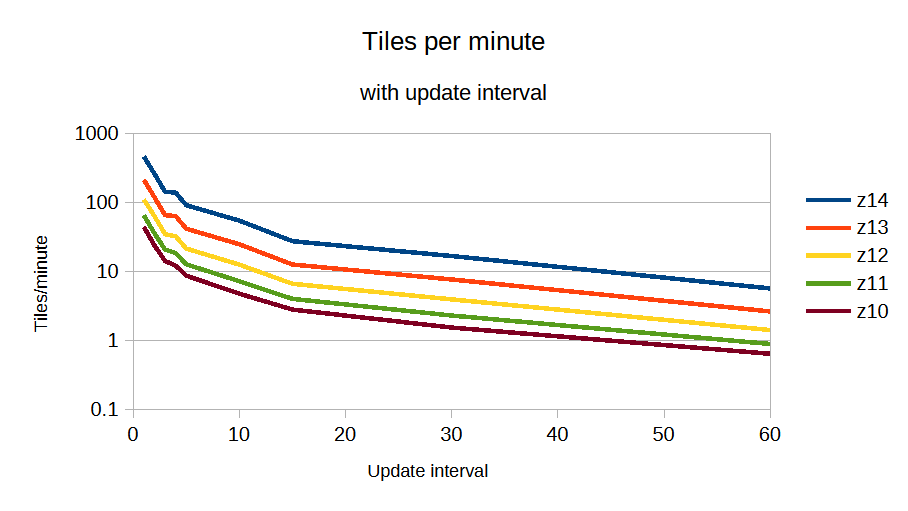
Finally, we can reproduce the <a href="https://www.geofabrik.de/media/2012-09-08-osm2pgsql-performance.pdf">Geofabrik graph</a>, looking at tiles per minute with update interval and get approximately <code>work ∝ update ^ -1.05</code>, where update is the number of minutes between updates. This means combining multiple updates is very effective at reducing load.</p>

<p><img src="http://www.paulnorman.ca/blog/2024/01/minutely-updated-tiles/tpm-interval.png" alt="Usage of standard layer in May" /></p>

<h2>What does all this mean?</h2>

<p>This has been a lot of numbers, which is useful for someone in my position, but what does this mean at a practical level?</p>

<ol>
<li><p>Big updates happen sometimes, which will slow everything down. Even a powerful server will slow down when multiple large country borders need to be regenerated.</p></li>
<li><p>As update interval slows down, the tile server has less work to do and can catch up. Updates every 10 minutes involve approximately 5 times less work than minutely updates, so when a particularly large update happens, the server can easily catch up.</p></li>
<li><p>A lower-end server capable of 10 tiles/second can still update every 3 minutes or faster 95% of the time, 3-15 minutes 4% of the time, and only 1% of the time fall farther behind.</p></li>
<li><p>You probably don&rsquo;t want to keep a minutely updated tileset running on your laptop.</p></li>
</ol>

]]></content>
  </entry>
  
  <entry>
    <title type="html"><![CDATA[Tilelog Country Data]]></title>
    <link href="http://www.paulnorman.ca/blog/2023/05/tilelog-country-data/"/>
    <updated>2023-05-21T20:00:00-08:00</updated>
    <id>http://www.paulnorman.ca/blog/2023/05/tilelog-country-data</id>
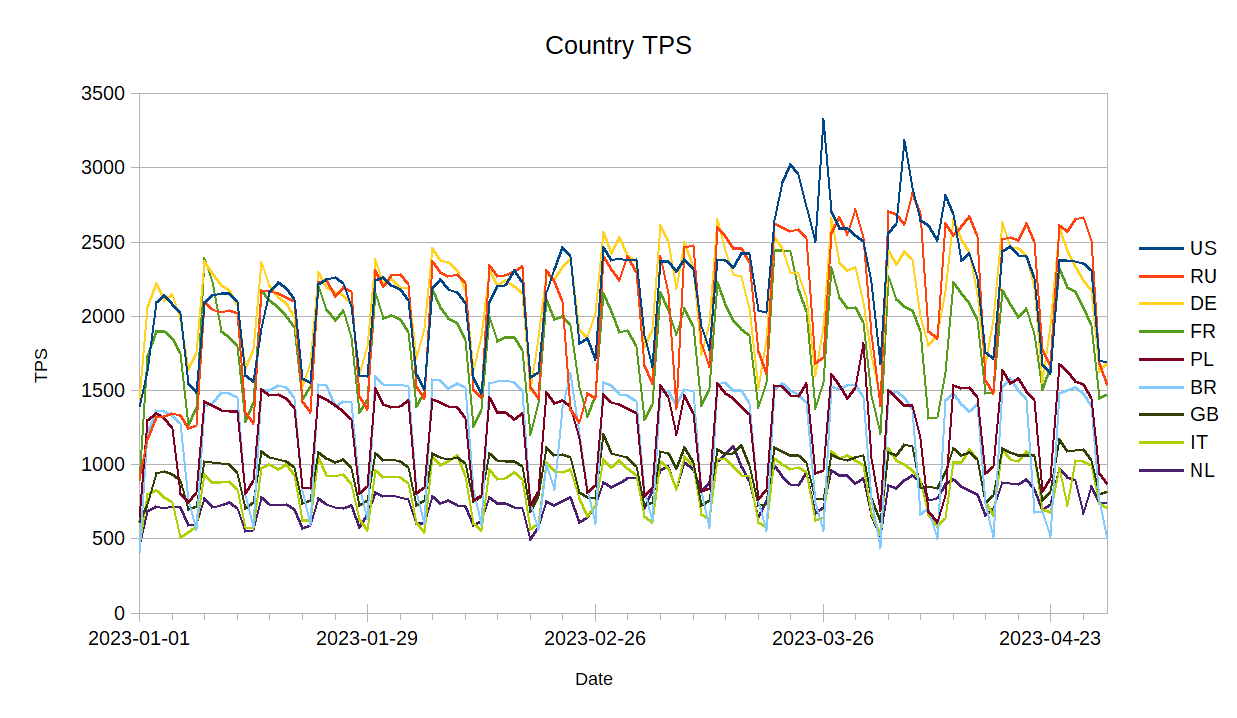
    <content type="html"><![CDATA[<p>I added functionality to <a href="https://github.com/openstreetmap/tilelog">tilelog</a> to generate per-country usage information for the OSMF Standard Map Layer. The output of this is a CSV file, generated every day, which contains country code, number of unique IPs that day, tiles per second, and tiles per second that were a cache miss, all for each country code.</p>

<p>With a bit of work, I manipulated the files to give me the usage from the 10 countries with the most usage, for the first four months of 2023.</p>

<p><img src="http://www.paulnorman.ca/blog/2023/05/tilelog-country-data/date.png" alt="Tile usage per country by date" /></p>

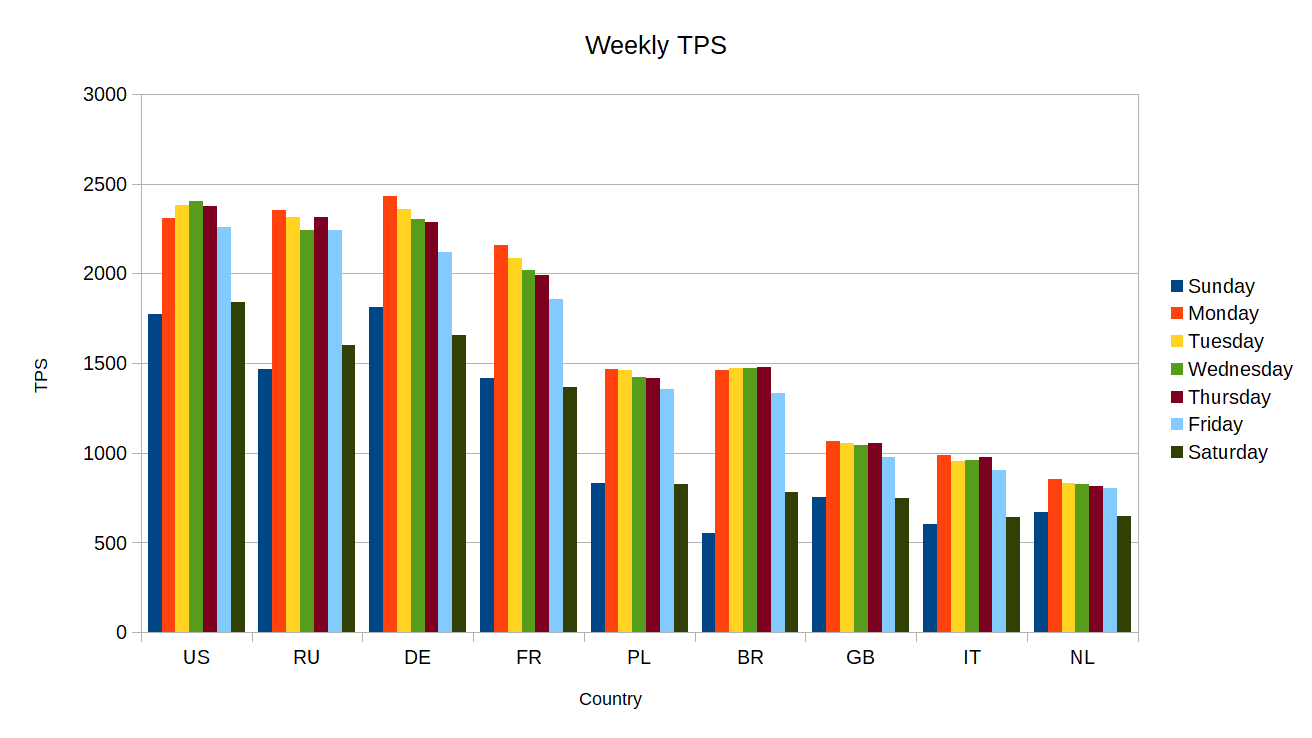
<p>Perhaps more interesting is looking at the usage for each country by the day of week.</p>

<p><img src="http://www.paulnorman.ca/blog/2023/05/tilelog-country-data/weekly.png" alt="Tile usage per country by date" /></p>
]]></content>
  </entry>
  
  <entry>
    <title type="html"><![CDATA[Tilekiln Tile Storage]]></title>
    <link href="http://www.paulnorman.ca/blog/2022/10/tilekiln-storage/"/>
    <updated>2022-10-09T20:00:00-08:00</updated>
    <id>http://www.paulnorman.ca/blog/2022/10/tilekiln-storage</id>
    <content type="html"><![CDATA[<p>I&rsquo;m rewriting <a href="https://github.com/pnorman/tilekiln">Tilekiln</a>, tile generation software which leverages PostGIS to allow using established toolchains like <a href="https://osm2pgsql.org/">osm2pgsql</a>.</p>

<p>Tile storage is a difficult problem. For a tileset going to zoom 14, there are 358 million tiles, and for one going to zoom 15, there are 1.4 billion. Most tiles are smalled, with 80% being about 100 bytes typically, and the largest tiles might be about 1 megabyte.</p>

<p>Tilekiln&rsquo;s storage must be able to handle these numbers, but also handle incremental minutely updates, and maintenance work like deleting tilesets. A nice to have would be the ability to distribute tilesets easily, but this is not essential.</p>

<h2>Options</h2>

<h3><a href="https://github.com/protomaps/PMTiles">PMTiles</a></h3>

<p>PMTiles is a file format designed to store an entire tileset in one file. It consists of a directory, which lists offsets for where tiles are within the larger file. Using range requests, any tile can be retrieved in 3 requests in the worst case, while any caching at all will bring this to 2 requests, and typical caching can bring it close to one.</p>

<p>It features de-duplication, both for tiles that are bytewise-indentical, as well as for adjacent offset listings pointing at the same tile.</p>

<p>There is client-side support for some map browser-based display libraries, but most applications will require a server returning conventional that handles conventional z/x/y URLs serving from the PMTiles file. As a fairly new format, support from other applications is limited.</p>

<p>Updating the PMTiles archive in place is possible, because the clients use etags to identify when the archive has changed, invalidating the client-side cache. This means with minutely updates, every one minute, one request from each client will be the worst case, requiring 3 requests. In practice, this doesn&rsquo;t matter, because for a large tileset, it is impossible to rewrite the entire archive that frequently, as it will take longer than that to write out the complete file.</p>

<h4>Pros</h4>

<ul>
<li>Generally most space efficient single-file tileset archive format</li>
<li>Easy to distribute</li>
<li>Can directly serve to some clients</li>
</ul>


<h4>Cons</h4>

<ul>
<li>Impossible to minutely update</li>
<li>Poor support for the archive format outside of specialized software and browser-based libraries</li>
</ul>


<h3><a href="https://github.com/mapbox/mbtiles-spec">MBTiles</a></h3>

<p>Like PMTiles, MBTiles is a single-file archive format. It was developed by Mapbox for users to generate tiles and upload them to Mapbox&rsquo;s servers. It&rsquo;s format is a SQLite database with tables consisting of tile indexes and tile data data as binary blobs. Because it&rsquo;s based on SQLite, and has been around for longer, support is wide-spread, with several generation. Browser-based support is limited, and it wasn&rsquo;t designed with that in mind.</p>

<p>Minutely updates are theoretically possible, but in practice, not a good idea. SQLite databases do not work well with high volumes of concurrent reads and writes, generally requiring all work to go through one process. This requires coupling the generation and serving systems.</p>

<h4>Pros</h4>

<ul>
<li>Easy to distribute</li>
<li>Good support for non-browser clients</li>
</ul>


<h4>Cons</h4>

<ul>
<li>Poor minutely support</li>
<li>Not suitable for directly serving to browsers</li>
</ul>


<h3>PostgreSQL</h3>

<p>Because Tilekiln already requires PostgreSQL, it would be possible to store tiles in it, the same way that MBTiles does.</p>

<h4>Pros</h4>

<ul>
<li>Supports minutely updates</li>
<li>Uses software already required</li>
</ul>


<h4>Cons</h4>

<ul>
<li>Custom format</li>
<li>Impossible to distribute the archive</li>
</ul>


<h3>Tiles on disk</h3>

<p>Instead of an archive format, it&rsquo;s possible to store tiles on disk as files. This is the most well-established method, and simplest. Tiles can be updated atomically, and serving tiles is just serving files from disk. The downside comes to managing millions or billions of tiny files. File systems are not designed for this, and can have problems with</p>

<ul>
<li>minimum file sizes,</li>
<li>inode usage,</li>
<li>inodes per directory, and</li>
<li>cleaning up tilesets.</li>
</ul>


<p>In particular, it can take a day or longer to delete a tileset.</p>

<h4>Pros</h4>

<ul>
<li>Supports minutely updates</li>
<li>Simple serving</li>
</ul>


<h4>Cons</h4>

<ul>
<li>Does not scale to planet-wide tilesets</li>
<li>No archive to distribute</li>
</ul>


<h3>Object stores</h3>

<p>A popular approach to store tiles in some form of object store, like S3. All commercial object stores I&rsquo;ve looked perform badly with large numbers of small objects. While there are sometimes work-arounds for this, their pricing structure generally makes it very expensive to store tiles this way.</p>

<h4>Pros</h4>

<ul>
<li>Easy to serve out of</li>
<li>Supports minutely updates</li>
</ul>


<h4>Cons</h4>

<ul>
<li>Very expensive, or requires running your own object store</li>
<li>Slow</li>
</ul>


<h3><a href="https://github.com/tapalcatl/tapalcatl-2-spec">Tapalcatl 2</a></h3>

<p>Tapalcatl 2 is a system of using zip files to combine tiles, reducing the number of tiles that need to be stored. It is similar to how raster tiles are combined into metatiles, except that the vector tiles are pre-sliced within the zipfile and can contain multiple zooms.</p>

<p>In a typical configuration, there are zip files generated for tiles on zooms 0, 4, 8, and 12. Each zip file contains the &ldquo;root&rdquo; tile and then tiles from the next three zooms that lie within it. This means that a zip archive contains 85 tiles, all tiles within a small area. By combining tiles into one zip archive, this reduces the number of files on disk to 16.8 million files, a small enough number to be reasonably managed on disk.</p>

<p>The format hasn&rsquo;t had a great deal of usage since it was developed, so support is limited to some server-side programs that take tapalcatl archives and present tiles to the user. These server-side programs are known to have some issues, like not supporting updates to remote tapalcatl tilesets.</p>

<p>Updates are possible in two ways. The first is by taking an existing zip file, replacing the changed tiles within it, and generating a new zip file. The second is to completely regenerate all the tiles in the zip file, which is simpler, but involves more tile generation.</p>

<h4>Pros</h4>

<ul>
<li>Supports minutely updates</li>
<li>Allows good decoupling of serving and generation</li>
</ul>


<h4>Cons</h4>

<ul>
<li>Limited client support</li>
<li>Minutely updates are more complicated</li>
</ul>


<h2>Recommendations</h2>

<p>The two options which requires further investigation are PostgreSQL and Tapalcatl 2. Both support updates, but come with downsides.</p>
]]></content>
  </entry>
  
  <entry>
    <title type="html"><![CDATA[OpenStreetMap Standard Layer: Requests]]></title>
    <link href="http://www.paulnorman.ca/blog/2021/07/standard-layer-2/"/>
    <updated>2021-07-26T20:00:00-08:00</updated>
    <id>http://www.paulnorman.ca/blog/2021/07/standard-layer-2</id>
    <content type="html"><![CDATA[<p>This blog post is a version of my recent SOTM 2021 presentation on the OpenStreetMap Standard Layer and who&rsquo;s using it.</p>

<p>With the switch to a commercial CDN, we’ve improved our logging significantly and now have the tools to log and analyze logs. We log information on both the incoming request and our response to it.</p>

<!--more-->


<p>We log</p>

<ul>
<li>user-agent, the program requesting the map tile;</li>
<li>referrer, the website containing a map;</li>
<li>some additional headers;</li>
<li>country and region;</li>
<li>network information;</li>
<li>HTTP protocol and TLS version;</li>
<li>response type;</li>
<li>duration;</li>
<li>size;</li>
<li>cache hit status;</li>
<li>datacenter;</li>
<li>and backend rendering server</li>
</ul>


<p>We log enough information to see what sites and programs are using the map, and additional debugging information. Our logs can easily be analyzed with a hosted Presto system, which allows querying large amounts of data in logfiles.</p>

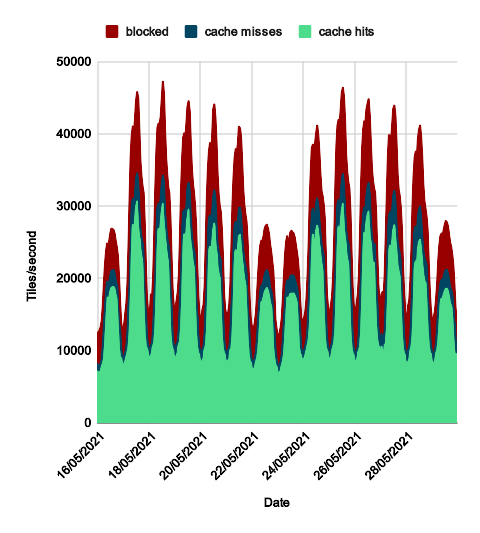
<p>I couldn’t do this talk without the ability to easily query this data and dive into the logs. So, let’s take a look at what the logs tell us for two weeks in May.</p>

<p><img src="http://www.paulnorman.ca/blog/2021/07/standard-layer-2/weeklyusage.png" alt="Usage of standard layer in May" /></p>

<p>Although the standard layer is used around the world, most of the usage correlates to when people are awake in the US and Europe. It’s tricky to break this down in more detail because we don’t currently log timezones. We&rsquo;ve added logging information which might make this easier in the future.</p>

<p>Based off of UTC time, which is close to European standard time, weekdays average 30 000 requests per second incoming while weekends average 21 000. The peaks, visible on the graph, show a greater difference. This is because the load on weekends is spread out over more of the day.</p>

<p>On average over the month we serve 27 000 requests per second, and of these, about 7 000 are blocked.</p>

<h2>Blocked Requests</h2>

<p>Seven thousand requests per second is a lot of blocked requests. We block programs that give bad requests or don’t follow the tile usage policy, mainly</p>

<ul>
<li>those which lie about what they are,</li>
<li>invalid requests,</li>
<li>misconfigured programs, or</li>
<li>scrapers trying to download everything</li>
</ul>


<p>They get served</p>

<ul>
<li><code>HTTP 400</code> Bad Request if invalid,</li>
<li><code>HTTP 403 Forbidden</code> if misconfigured,</li>
<li><code>HTTP 418 I'm a teapot</code> if pretending to be a different client, or</li>
<li><code>HTTP 429 Too Many Requests</code> if they are automatically blocked for making excessive requests by scraping.</li>
</ul>


<p>Before blocking we attempt to contact them, but this doesn’t always work if they’re hiding who they are, or they frequently don’t respond.</p>

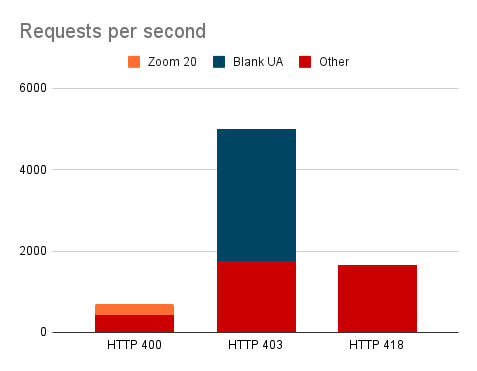
<p>HTTP 400 responses are for tiles that don&rsquo;t exist and will never exist. A quarter of these are for zoom 20, which we&rsquo;ve never served.</p>

<p>For the HTTP 403 blocked requests, most are not sending a user-agent, a required piece of information. The others are a mix of blocked apps and generic user-agents which don’t allow us to identify the app.</p>

<p>Fake requests get a HTTP 418 response, and they&rsquo;re nearly all scrapers pretending to be browsers.</p>

<p><img src="http://www.paulnorman.ca/blog/2021/07/standard-layer-2/mayerrors.png" alt="May blocked chart" /></p>

<p>In July we added automatic blocking of IPs that were scraping the standard layer, responding with HTTP 429 IPs that are requesting way too many tiles from the backend. This only catches scrapers, but a tiny 0.001% of users were causing 13% of the load, and 0.1% of QGIS users causing 38% of QGIS load.</p>

<p><img src="http://www.paulnorman.ca/blog/2021/07/standard-layer-2/mayerrors.png" alt="July blocked chart" /></p>
]]></content>
  </entry>
  
  <entry>
    <title type="html"><![CDATA[OpenStreetMap Standard Layer: Introduction]]></title>
    <link href="http://www.paulnorman.ca/blog/2021/07/standard-layer-1/"/>
    <updated>2021-07-10T20:00:00-08:00</updated>
    <id>http://www.paulnorman.ca/blog/2021/07/standard-layer-1</id>
    <content type="html"><![CDATA[<p>This blog post is a version of my recent SOTM 2021 presentation on the OpenStreetMap Standard Layer and who&rsquo;s using it.</p>

<p>The OpenStreetMap Standard Layer is the default layer on <a href="https://www.openstreetmap.org/#layers=M">openstreetmap.org</a>, using most of the front page. It&rsquo;s run by the OpenStreetMap Foundation, and the Operations Working Group is responsible for the planning, organisation and budgeting of OSMF-run services like this one and servers running it. There are other map layers on the front page like <a href="https://www.openstreetmap.org/#layers=C">Cycle Map</a> and <a href="https://www.openstreetmap.org/#layers=T">Transport Map</a>, and I encourage you to try them, but they&rsquo;re not hosted or planned by us.</p>

<!--more-->


<h2>Technology</h2>

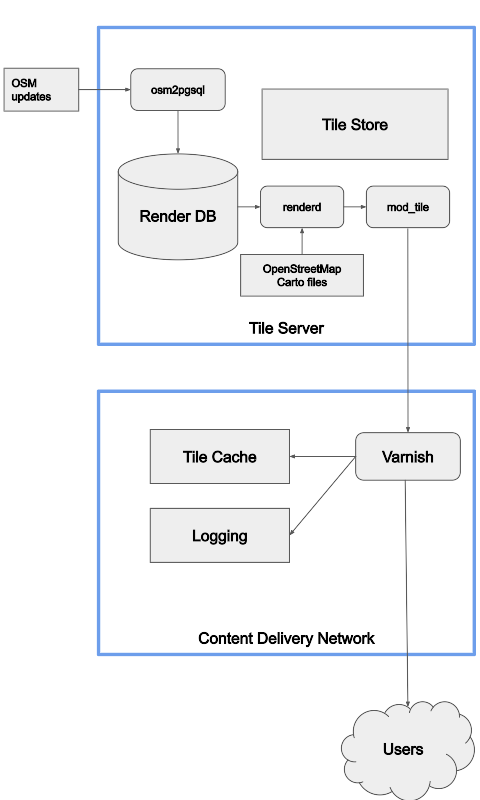
<p>At the high level, this is the overview of the technology the OWG is responsible for. The standard layer is divided into million of parts, each of which is called a tile, and we serve tiles.</p>

<p><img src="http://www.paulnorman.ca/blog/2021/07/standard-layer-1/tech.png" alt="Flowchart of rendering" /></p>

<p>OSM updates flow into a tile server, where they go into a database. When a tile is needed, a program called renderd makes and store the tile, and something called mod_tile serves it over the web. We have multiple render servers for redundancy and capacity. We’re completely responsible for these, although some of them run on donated hardware.</p>

<p>In front of the tile server we have a content delivery network. This is a commercial service that caches files closer to the users, serving 90% of user requests. It is much faster and closer to the users, but knows nothing about maps. We’re only responsible for the configuration.</p>

<p>The difference between the tile store and tile cache is how they operate, and size. The tile store is much larger and stores more tiles.</p>

<p>Only the cache misses from the CDN impose a load on our servers. When looking at improving performance of the standard layer, I tend to look at cache misses and how to reduce them.</p>

<h2>Policy</h2>

<p>The OWG has a <a href="https://operations.osmfoundation.org/policies/tiles/">tile usage policy</a> that sets out what you can and cannot do with our tile layer. We are in principle happy for our map tiles to be used by external users for creative and unexpected uses, but our priority is providing a quickly updating map to improve the editing cycle. This is a big difference between the standard layer and most other commercially available map layers, which might update weekly or monthly.</p>

<p>We prohibit some acitivities like bulk-downloading tiles for a large area (&ldquo;scraping&rdquo;) because it puts an excessive load on our servers. This is because we render tiles on-demand and someone scraping all the tiles in an area is downloading tiles they will never view.</p>
]]></content>
  </entry>
  
  <entry>
    <title type="html"><![CDATA[OpenStreetMap Survey by Visits]]></title>
    <link href="http://www.paulnorman.ca/blog/2021/02/openstreetmap-visits/"/>
    <updated>2021-02-17T11:00:00-08:00</updated>
    <id>http://www.paulnorman.ca/blog/2021/02/openstreetmap-visits</id>
    <content type="html"><![CDATA[<p>In my <a href="http://www.paulnorman.ca/blog/2021/02/openstreetmap-survey/">last post</a> I looked at <a href="https://wiki.osmfoundation.org/wiki/2021_Survey_Results">survey responses</a> by country and their correlation with mappers eligible for a fee waver as an active contributor.</p>

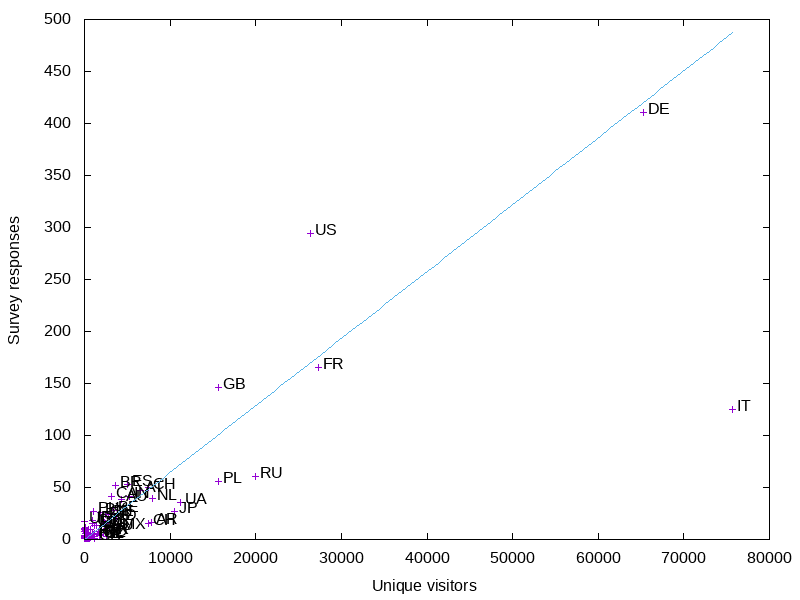
<p>I wanted to look at the correlation with OSM.org views. I already had a full day&rsquo;s worth of logs on tile.openstreetmap.org accesses, so I filtered them for requests from www.openstreetmap.org and got a <a href="https://gist.github.com/pnorman/d6e7f5c82f5efd80a4d6a0c6f37cdb7f">per-country count</a>. This is from December 29th, 2020. Ideally it would be from a complete week, and not a holiday, but this is the data I had downloaded.</p>

<p><img src="http://www.paulnorman.ca/blog/2021/02/openstreetmap-visits/tiles.png" alt="Preview image" /></p>

<p>The big outlier is Italy. It has more visits than I would expect, so I wonder if the holiday had an influence. Like before, the US is overrepresented in the results, Russia and Poland are underrepresented, and Germany is about average.</p>

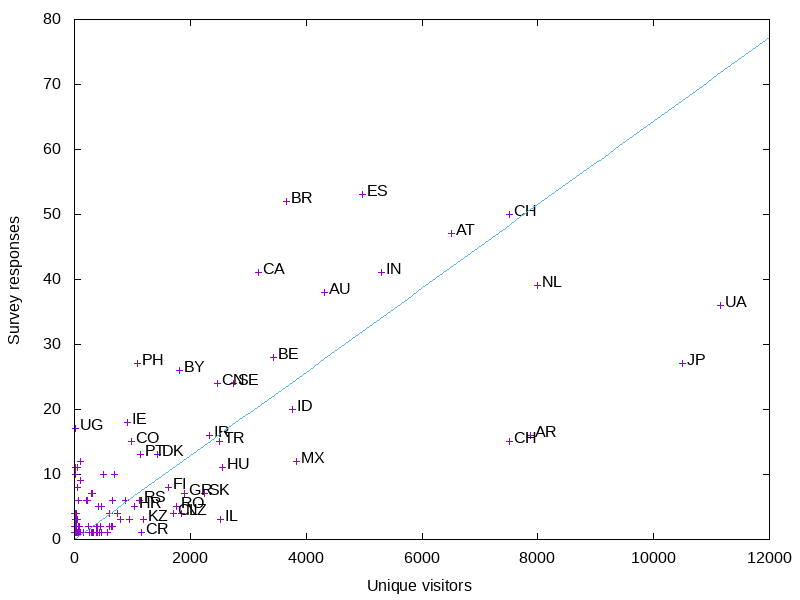
<p>Like before, I made a graph of the smaller countries.</p>

<p><img src="http://www.paulnorman.ca/blog/2021/02/openstreetmap-visits/tilessmall.png" alt="Preview image" /></p>

<p>More small countries are above the average line - probably an influence of Italy being so low.</p>
]]></content>
  </entry>
  
  <entry>
    <title type="html"><![CDATA[OpenStreetMap Survey]]></title>
    <link href="http://www.paulnorman.ca/blog/2021/02/openstreetmap-survey/"/>
    <updated>2021-02-17T11:00:00-08:00</updated>
    <id>http://www.paulnorman.ca/blog/2021/02/openstreetmap-survey</id>
    <content type="html"><![CDATA[<p>The board has <a href="https://wiki.osmfoundation.org/wiki/2021_Survey_Results">started releasing</a> results from their 2021 survey. I&rsquo;ve done some analysis on the response rates by country.</p>

<p>There&rsquo;s lots of data for activity on OSM by country, but for this I took the numbers from joost for how many &ldquo;<a href="https://www.openstreetmap.org/user/joost%20schouppe/diary/395012">active contributors&#8221; there are according to the contributor fee waver criteria</a>.</p>

<p><img src="http://www.paulnorman.ca/blog/2021/02/openstreetmap-survey/countries.png" alt="Preview image" /></p>

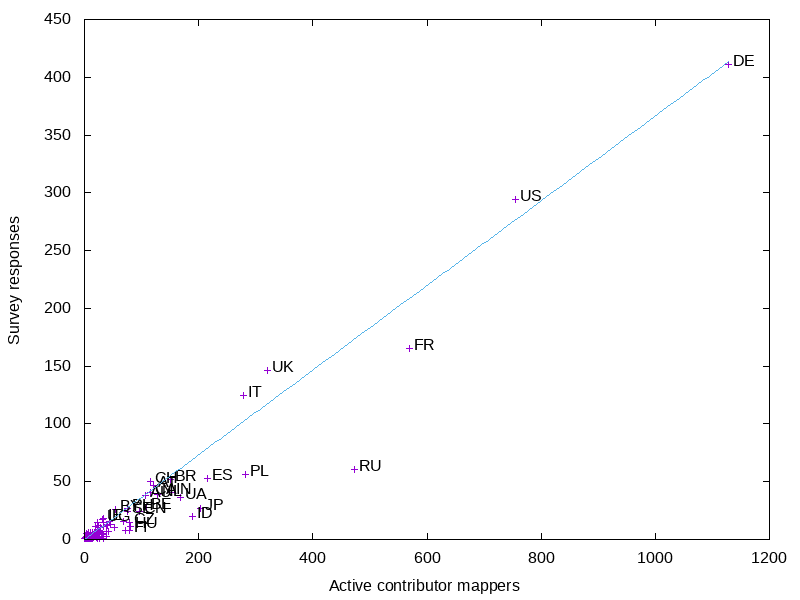
<p>For the larger countries, Russia is the most underrepresented country. This is not surprising, as they are underrepresented in other venues like the OSMF membership.</p>

<p>The US and UK are both slightly overrepresented in the survey, but less so than I would have expected based on other surveys and OSMF membership.</p>

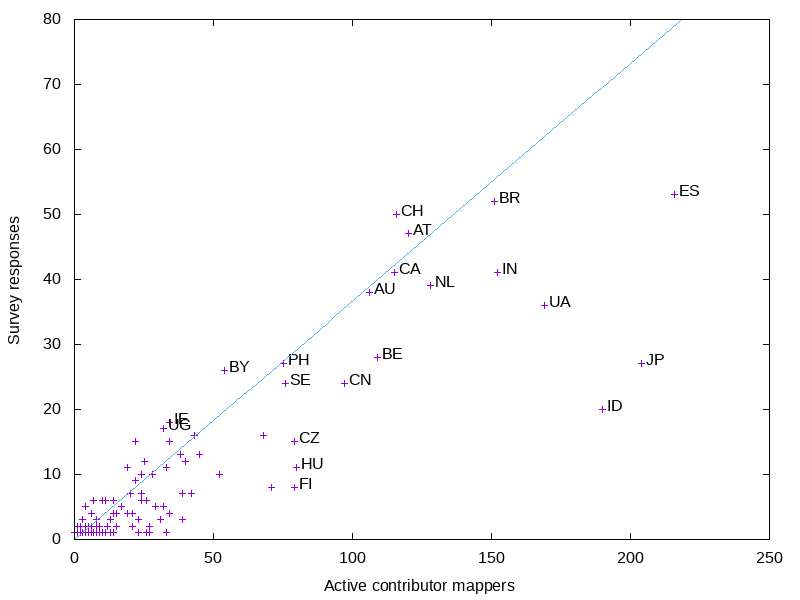
<p>The smaller countries are all crowded, so I did a graph of just them.</p>

<p><img src="http://www.paulnorman.ca/blog/2021/02/openstreetmap-survey/countriessmall.png" alt="Preview image" /></p>

<p>As with other surveys, Japan is underrepresented. Indonesia, although underrepresented is less underrepresented than I would have expected.</p>
]]></content>
  </entry>
  
  <entry>
    <title type="html"><![CDATA[OpenStreetMap Cartographic: A Client-side Rendered OpenStreetMap Carto]]></title>
    <link href="http://www.paulnorman.ca/blog/2020/05/openstreetmap-cartographic/"/>
    <updated>2020-05-24T18:00:00-08:00</updated>
    <id>http://www.paulnorman.ca/blog/2020/05/openstreetmap-cartographic</id>
    <content type="html"><![CDATA[<p>I&rsquo;ve been working on a new project, OpenStreetMap Cartographic. This is a client-side rendering based on OpenStreetMap Carto. This is an ambitious project, as OpenStreetMap Carto is an extremely complex style which shows a large number of features. The technical choices I&rsquo;m making are designed so the style is capable of handling the load of osm.org with minutely updates.</p>

<p>I&rsquo;ve put up a world-wide demo at <a href="https://pnorman.dev.openstreetmap.org/cartographic/mapbox-gl.html">https://pnorman.dev.openstreetmap.org/cartographic/mapbox-gl.html</a>, using data from 2020-03-16, and you can view the code at <a href="https://github.com/pnorman/openstreetmap-cartographic">https://github.com/pnorman/openstreetmap-cartographic</a>.</p>

<!--more-->


<p><img src="http://www.paulnorman.ca/blog/2020/05/openstreetmap-cartographic/preview.png" alt="Preview image" /></p>

<h2>Incomplete parts</h2>

<p>Only zoom 0 to 8 has been implemented so far. I started at zoom 0 and am working my way down.</p>

<p>Admin boundaries are not implemented. OpenStreetMap Carto uses Mapnik-specific tricks to deduplicate the rendering of these. I know how I can do this, but it requires the changes I intend to make with the flex backend.</p>

<p>Landuse, vegetation, and other natural features are not rendered until zoom 7. This is the scale of OpenStreetMap Carto zoom 8, and these features first appear at zoom 5. There are numerous problems with unprocessed OpenStreetMap data at these scales. OpenStreetMap Carto gets a result that looks acceptable but is poor at conveying information by tweaking Mapnik image rasterizing options. I&rsquo;m looking for better options here involving preprocessed data, but haven&rsquo;t found any.</p>

<p>I&rsquo;m still investigating how to best distribute sprites.</p>

<h2>Technology</h2>

<p>The technology choices are designed to be suitable for a replacement for tile.osm.org. This means minutely updates, high traffic, high reliability, and multiple servers. <a href="https://github.com/pnorman/tilekiln">Tilekiln</a>, the vector tile generator, supports all of these. It&rsquo;s designed to better share the rendering results among multiple servers, a significant flaw with renderd + mod_tile and the standard filesystem storage. It uses PostGIS&#8217; ST_AsMVT, which is very fast with PostGIS 3.0. On my home system generates z0-z8 in under 40 minutes.</p>

<p>Often forgotten is the development requirements. The style needs to support multiple developers working on similar areas, git merge conflicts while maintaining an easy development workflow. I&rsquo;m still figuring this out. Mapbox GL styles are written in JSON and most of the tools overwrite any formatting. This means there&rsquo;s no way to add comments to lines of codes. Comments are a requirement for a style like this, so I&rsquo;m investigating minimal pre-processing options. The downside to this will make it harder to use with existing GUI editors like <a href="https://fresco.gospatial.org/">Fresco</a> or <a href="https://maputnik.github.io/">Maputnik</a>.</p>

<h2>Cartography</h2>

<p>The goal of this project isn&rsquo;t to do big cartography changes yet, but client-side rendering opens up new tools. The biggest immediate change is zoom is continuous, no longer an integer or fixed value. This means parameters like sizes can smoothly change as you zoom in and out, specified by their start and end size instead of having to specify each zoom.</p>

<h2>Want to help?</h2>

<p>Have a look at <a href="https://github.com/pnorman/openstreetmap-cartographic">https://github.com/pnorman/openstreetmap-cartographic</a> and have a go at setting it up and generating your own map. If you have issues, open an issue or pull request. Or, because OpenStreetMap Cartographic uses <a href="https://github.com/pnorman/tilekiln">Tilekiln</a> have a look at <a href="https://github.com/pnorman/tilekiln/issues">its issue list</a>.</p>
]]></content>
  </entry>
  
  <entry>
    <title type="html"><![CDATA[Creating Tarballs]]></title>
    <link href="http://www.paulnorman.ca/blog/2019/01/creating-tarballs/"/>
    <updated>2019-01-14T13:21:06-08:00</updated>
    <id>http://www.paulnorman.ca/blog/2019/01/creating-tarballs</id>
    <content type="html"><![CDATA[<p>With all the tiles <a href="http://www.paulnorman.ca/blog/2018/12/seeding/">generated</a> and <a href="http://www.paulnorman.ca/blog/2018/12/optimizing">optimized</a>, they just need to be packaged in a tarball. Before creating them, we want to create some files with metadata about what was used to generate the tiles. The commit of the stylesheet and the timestamp of the planet file can be extracted with a couple of commands.</p>

<!--more-->


<figure class='code'><div class="highlight"><table><tr><td class="gutter"><pre class="line-numbers"><span class='line-number'>1</span>
<span class='line-number'>2</span>
</pre></td><td class='code'><pre><code class=''><span class='line'>osmium fileinfo -g 'header.option.osmosis_replication_timestamp' "${PLANET_FILE}" &gt; osm_tiles/timestamp
</span><span class='line'>git -C openstreetmap-carto rev-parse HEAD &gt; osm_tiles/commit</span></code></pre></td></tr></table></div></figure>


<p>Not every user will want all the zooms, so I&rsquo;m creating multiple tarballs, going from zoom 0 to zoom 6, 0 to 8, and 0 to 10. This duplicates data between the files, but makes them more useful since only one file needs downloading.</p>

<p><code>tar</code> will pack all of the tiles into one file, and can optionally compress them. Compressing a png won&rsquo;t normally save space, but compressing a bunch of PNGs, many of which are identical will save space.</p>

<figure class='code'><div class="highlight"><table><tr><td class="gutter"><pre class="line-numbers"><span class='line-number'>1</span>
<span class='line-number'>2</span>
<span class='line-number'>3</span>
</pre></td><td class='code'><pre><code class=''><span class='line'>GZIP='--rsyncable --best' tar -C osm_tiles --create --gzip --file tarballs/z6.tar.gz commit timestamp 0 1 2 3 4 5 6
</span><span class='line'>GZIP='--rsyncable --best' tar -C osm_tiles --create --gzip --file tarballs/z8.tar.gz commit timestamp 0 1 2 3 4 5 6 7 8
</span><span class='line'>GZIP='--rsyncable --best' tar -C osm_tiles --create --gzip --file tarballs/z10.tar.gz commit timestamp 0 1 2 3 4 5 6 7 8 9 10</span></code></pre></td></tr></table></div></figure>


]]></content>
  </entry>
  
  <entry>
    <title type="html"><![CDATA[Optimizing PNGs]]></title>
    <link href="http://www.paulnorman.ca/blog/2018/12/optimizing-pngs/"/>
    <updated>2018-12-27T23:40:23-08:00</updated>
    <id>http://www.paulnorman.ca/blog/2018/12/optimizing-pngs</id>
    <content type="html"><![CDATA[<p>With the <a href="http://www.paulnorman.ca/blog/2018/12/seeding/">tiles generated</a> normally the next step would be to serve them, but because I&rsquo;m planning to distribute them to others, I&rsquo;m going to the unusual step of optimizing the PNGs. Optimizing PNGs can cut the file size in half, helping downstream users of the tiles I&rsquo;m generating.</p>

<!--more-->


<p>To make use of all the cores of my CPU, I&rsquo;m going to use <code>find</code> to locate the PNGs, then the program <code>parallel</code> to have <code>optipng</code> operate in parallel.</p>

<p>OptiPNG is a program that performs lossless optimization on PNGs. Because low-zoom tiles are more likely to be viewed and there&rsquo;s fewer of them, I&rsquo;ll call the program with different options, doing more aggressive optimizations on low-zoom tiles. There&rsquo;s no magic right answer for much time to spend compressing, but I found these reasonable, and save up to 50% space on some zooms.</p>

<figure class='code'><div class="highlight"><table><tr><td class="gutter"><pre class="line-numbers"><span class='line-number'>1</span>
<span class='line-number'>2</span>
<span class='line-number'>3</span>
</pre></td><td class='code'><pre><code class=''><span class='line'>find osm_tiles/{0,1,2,3,4,5,6}/ -type f -name '*.png' -print0 | parallel -0 -m optipng -quiet -o4 -strip all
</span><span class='line'>find osm_tiles/{7,8}/ -type f -name '*.png' -print0 | parallel -0 -m optipng -quiet -o2 -strip all
</span><span class='line'>find osm_tiles/{9,10}/ -type f -name '*.png' -print0 | parallel -0 -m optipng -quiet -o1 -strip all</span></code></pre></td></tr></table></div></figure>


<p>The space used can be measured with <code>du -hsc --apparent-size osm_tiles/*</code>. <code>--apparent-size</code> is essential since many of the tiles will be below the size of one block on disk.</p>

<p>All of this is of course not required, but helps a bit, and is an interesting experiement regardless.</p>
]]></content>
  </entry>
  
  <entry>
    <title type="html"><![CDATA[Seeding Tiles]]></title>
    <link href="http://www.paulnorman.ca/blog/2018/12/seeding/"/>
    <updated>2018-12-24T12:15:00-08:00</updated>
    <id>http://www.paulnorman.ca/blog/2018/12/seeding</id>
    <content type="html"><![CDATA[<p>With the database loaded, all the software installed, and everything configured, it&rsquo;s time to render tiles. This is done with the <code>mapproxy-seed</code> program, using the previous config files. The only option needed besides config file locations is <code>-c</code> which sets how many CPU threads to use. For the machine I&rsquo;m using, 7 works best. Fewer leaves some capacity idle, while running with too many threads starves PostgreSQL and system of any CPU time.</p>

<!--more-->


<figure class='code'><div class="highlight"><table><tr><td class="gutter"><pre class="line-numbers"><span class='line-number'>1</span>
</pre></td><td class='code'><pre><code class=''><span class='line'>mapproxy/bin/mapproxy-seed -s seed.yaml -f mapproxy.yaml -c 7</span></code></pre></td></tr></table></div></figure>


<p>How long this takes depends on to what zoom you&rsquo;re seeding, and how powerful the server is. On my server it takes about four hours to seed to zoom 10.</p>
]]></content>
  </entry>
  
  <entry>
    <title type="html"><![CDATA[Configuring MapProxy]]></title>
    <link href="http://www.paulnorman.ca/blog/2018/12/configuring-mapproxy/"/>
    <updated>2018-12-21T03:43:27-08:00</updated>
    <id>http://www.paulnorman.ca/blog/2018/12/configuring-mapproxy</id>
    <content type="html"><![CDATA[<p>MapProxy needs a couple of configuration files. One defines the layers, caches, and services that it runs. The other is used for &ldquo;seeding&rdquo; the cache, and specifies what to pre-render.</p>

<p>There&rsquo;s a lot of documentation on MapProxy configuration files, and example ones can be created with <code>mapproxy/bin/mapproxy-util create -t base-config</code>.</p>

<!--more-->


<p>The first file is <code>mapproxy.yaml</code>, which defines the layers to be rendered</p>

<figure class='code'><div class="highlight"><table><tr><td class="gutter"><pre class="line-numbers"><span class='line-number'>1</span>
<span class='line-number'>2</span>
<span class='line-number'>3</span>
<span class='line-number'>4</span>
<span class='line-number'>5</span>
<span class='line-number'>6</span>
<span class='line-number'>7</span>
<span class='line-number'>8</span>
<span class='line-number'>9</span>
<span class='line-number'>10</span>
<span class='line-number'>11</span>
<span class='line-number'>12</span>
<span class='line-number'>13</span>
<span class='line-number'>14</span>
<span class='line-number'>15</span>
<span class='line-number'>16</span>
<span class='line-number'>17</span>
<span class='line-number'>18</span>
<span class='line-number'>19</span>
<span class='line-number'>20</span>
<span class='line-number'>21</span>
<span class='line-number'>22</span>
<span class='line-number'>23</span>
<span class='line-number'>24</span>
<span class='line-number'>25</span>
<span class='line-number'>26</span>
<span class='line-number'>27</span>
<span class='line-number'>28</span>
<span class='line-number'>29</span>
</pre></td><td class='code'><pre><code class=''><span class='line'># This sets up the service at tiles/osm, which is useful for debugging.
</span><span class='line'># It doesn't get used for seeding.
</span><span class='line'>services:
</span><span class='line'>  demo:
</span><span class='line'>  tms:
</span><span class='line'>    use_grid_names: true
</span><span class='line'>    origin: 'nw'
</span><span class='line'>
</span><span class='line'># Just one layer with OSM carto
</span><span class='line'>layers:
</span><span class='line'>  - name: osm
</span><span class='line'>    title: OpenStreetMap Carto
</span><span class='line'>    sources: [osm_cache]
</span><span class='line'>
</span><span class='line'>caches:
</span><span class='line'>  osm_cache:
</span><span class='line'>    grids: [GLOBAL_WEBMERCATOR]
</span><span class='line'>    sources: [osm-carto]
</span><span class='line'>    meta_size: [8,8]
</span><span class='line'>    cache:
</span><span class='line'>      type: file
</span><span class='line'>      # Force a meaningful name, since this is only being used for seeding
</span><span class='line'>      directory: osm_tiles
</span><span class='line'>      directory_layout: tms
</span><span class='line'>
</span><span class='line'>sources:
</span><span class='line'>  osm-carto:
</span><span class='line'>    type: mapnik
</span><span class='line'>    mapfile: openstreetmap-carto/project.xml</span></code></pre></td></tr></table></div></figure>


<p>This file can be tested with the command <code>mapproxy/bin/mapproxy-util serve-develop mapproxy.yaml</code>, then the URL <code>http://localhost:8080/tiles/1.0.0/osm/GLOBAL_WEBMERCATOR/0/0/0.png</code> should be a single tile covering the world.</p>

<p>The second file is <code>seed.yaml</code></p>

<figure class='code'><div class="highlight"><table><tr><td class="gutter"><pre class="line-numbers"><span class='line-number'>1</span>
<span class='line-number'>2</span>
<span class='line-number'>3</span>
<span class='line-number'>4</span>
<span class='line-number'>5</span>
</pre></td><td class='code'><pre><code class=''><span class='line'>seeds:
</span><span class='line'>  world:
</span><span class='line'>    caches: [osm_cache]
</span><span class='line'>    levels:
</span><span class='line'>      to: 8</span></code></pre></td></tr></table></div></figure>


<p>This sets up a seeding area covering the entire world from zoom 0 to zoom 8. The seeding can be run with <code>mapproxy/bin/mapproxy-seed -s seed.yaml -f mapproxy.yaml</code> and the <code>-c</code> option can be added to set parallelism. After this is done, the tiles are generated, they just need to be packaged.</p>
]]></content>
  </entry>
  
  <entry>
    <title type="html"><![CDATA[More Work on Bolder]]></title>
    <link href="http://www.paulnorman.ca/blog/2018/08/more-work-on-bolder/"/>
    <updated>2018-08-08T09:01:08-07:00</updated>
    <id>http://www.paulnorman.ca/blog/2018/08/more-work-on-bolder</id>
    <content type="html"><![CDATA[<p>After the birds of a feather session <a href="http://systemed.net/">Richard Fairhurst</a> lead at State of the Map, I was motivated to continue some work on <a href="https://github.com/pnorman/bolder">bolder</a>, a client-side style I&rsquo;ve been working on.</p>

<p>While I was working at the Wikimedia Foundation, I developed <a href="https://github.com/kartotherian/brighmed">brighmed</a>, a CartoCSS style using vector tiles. Wikimedia decided not to flip the switch to deploy the style, but the style is open source, so I can use it elsewhere. Making this decision, I spent a day implementing most of it in Tangram.</p>

<!--more-->


<p><img src="http://www.paulnorman.ca/blog/2018/08/more-work-on-bolder/current-bolder.png" alt="Bolder example image" /></p>

<p>What&rsquo;s next?</p>

<p>I&rsquo;ve got some missing features like service roads and some railway values to add, then I can look at new stuff like POIs. For that I&rsquo;ll need to look at icons and where to fit them into colourspace.</p>

<p>There&rsquo;s a bunch of label work that needs to be done, what I have is just a first pass, and some things like motorway names have big issues, and ref tags still need rendering. Label quality is of course a unending quest, but I should be able to get some big gains without much work.</p>

<p>Richard is planning to do some work on writing a schema, and if it works, I&rsquo;d like to adopt it. At the same time, I don&rsquo;t want to tie myself to an external schema which may have different cartographic aims, so I&rsquo;ll have to see how that works out. Looking at past OpenStreetMap Carto changes to <code>project.mml</code>, I found that what would be breaking schema changes on a vector tile project are less common than I thought, happening about once every 4-6 months. Most of the schema changes that would have happened were compatible and could be handled by regenerating tiles in the background.</p>
]]></content>
  </entry>
  
  <entry>
    <title type="html"><![CDATA["Make the Website Use the API" GSOC Project]]></title>
    <link href="http://www.paulnorman.ca/blog/2018/02/make-the-website-use-the-api-gsoc-project/"/>
    <updated>2018-02-22T15:30:16-08:00</updated>
    <id>http://www.paulnorman.ca/blog/2018/02/make-the-website-use-the-api-gsoc-project</id>
    <content type="html"><![CDATA[<p>I&rsquo;m a potential mentor for the Google Summer of Code project. The goal of this project is to change the website to rely on API calls instead of website-only database queries. It&rsquo;s focused on the &ldquo;browse&rdquo; pages for each object, and might need additions to the API to fully reproduce the functionality. Because I get asked a lot, this is a blog post on what I&rsquo;d suggest doing if you&rsquo;re a student interested in the project.</p>

<!--more-->


<h2>1. Know Ruby and JavaScript</h2>

<p>The website code is mainly in Ruby on Rails, and you need to know this before starting the project. JavaScript is a good idea, as one implementation route requires client-side JavaScript changes.</p>

<h2>2. Map a bit</h2>

<p>It may seem odd for the first step of a coding project to have nothing to do with coding, but it&rsquo;s essential. You need to learn about OSM&rsquo;s data model, architecture, and what it&rsquo;s used for, and the fastest way to do this is with by mapping. You&rsquo;ll also be looking at how editing software interacts with the API. It doesn&rsquo;t matter too much what you map, but I&rsquo;d suggest around your university, a past job, or some other area you&rsquo;re familiar with.</p>

<h2>3. Read Matt&rsquo;s background post</h2>

<p>Matt Amos <a href="http://www.asklater.com/matt/blog/2015/11/18/the-road-to-api-07/">wrote a blog post</a> on API changes which puts this project into a wider context. Most of the work there isn&rsquo;t part of the GSOC project, but it helps understand why we want to do this project.</p>

<h2>4. Read the API documentation</h2>

<p>The <a href="https://wiki.openstreetmap.org/wiki/API_v0.6">API documentation</a> covers all of the API calls, but the ones that are particularly important for the project are the read calls for elements, full versions for ways and relations, ways for node call, relations for element, read and download calls for changesets, and read note call.</p>

<p>The map call, and changeset model are also important concepts to understand.</p>

<h2>5. Use JOSM with the console open</h2>

<p>Start JOSM with a console window open, and will show all the API calls it makes. When you&rsquo;ve done this, edit some more. Make sure to use the show object, show object history, download relation, and other tools that download data. Watch what API calls are made, compare them against the API documentation, and understand what it&rsquo;s doing.</p>

<h2>6. Explore getting object information</h2>

<p>There&rsquo;s a few ways to get object information. The obvious one is the &ldquo;browse&rdquo; pages at <code>https://www.openstreetmap.org/way/&lt;N&gt;</code>, but also include history view in JOSM and <a href="http://osmlab.github.io/osm-deep-history/">OSM Deep History</a>. The first page doesn&rsquo;t use the API and the second two do. The goal of this project is to make the first page use the API.</p>

<h2>7. Examine a browse page</h2>

<p>The next two steps are a form of homework and necessary to write your proposal. Look at a the node browse page for <a href="https://www.openstreetmap.org/node/5324545411">node 5324545411</a>. Write down what API calls are needed to get all the information on it. It should be possible to do it in a fixed number of API calls, in this case four calls.</p>

<h2>8. Identify missing API calls</h2>

<p>For some browse pages it&rsquo;s not possible to get all the information in a fixed number of API calls. Take a look at <a href="https://www.openstreetmap.org/way/471813907">way 471813907</a> and see what infomation is missing or would require recursive API calls. Part of the project will be proposing and implementing new API calls to fill the missing needs.</p>

<p>Some more background is found in some emails from a year ago</p>

<ul>
<li><a href="https://lists.openstreetmap.org/pipermail/dev/2017-February/029705.html">https://lists.openstreetmap.org/pipermail/dev/2017-February/029705.html</a> and a pure-javascript approach vs internal calls to API endpoints</li>
<li><a href="https://lists.openstreetmap.org/pipermail/dev/2017-February/029700.html">https://lists.openstreetmap.org/pipermail/dev/2017-February/029700.html</a> another writeup, including the two possible technical routes for this</li>
</ul>

]]></content>
  </entry>
  
  <entry>
    <title type="html"><![CDATA[Installing MapProxy]]></title>
    <link href="http://www.paulnorman.ca/blog/2018/02/installing-mapproxy/"/>
    <updated>2018-02-06T03:05:24-08:00</updated>
    <id>http://www.paulnorman.ca/blog/2018/02/installing-mapproxy</id>
    <content type="html"><![CDATA[<p>Switching gears, with the database loaded, it&rsquo;s time to install more software.</p>

<p>OpenStreetMap Carto generates a Mapnik XML stylesheet, which can be used by any software that includes Mapnik. Some of the common options are</p>

<!--more-->


<ul>
<li><a href="https://github.com/openstreetmap/mod_tile">renderd</a> for serving tiles,</li>
<li><a href="https://github.com/Zverik/Nik4">Nik4</a> for static images,</li>
<li><a href="https://mapproxy.org/">MapProxy</a> for serving tiles,</li>
<li><a href="http://tilestache.org/">TileStache</a> for serving tiles, and</li>
<li><a href="https://github.com/openstreetmap/mapnik-stylesheets/blob/master/generate_tiles.py">generate_tiles.py</a>.</li>
</ul>


<p>None of these options is perfect for anything. For this particular use the requirements are</p>

<ul>
<li>renders using metatiles,</li>
<li>creates a directory of PNGs,</li>
<li>works in parallel.</li>
</ul>


<p>The options which meet this are:</p>

<ul>
<li>renderd + mod_tile/tirex and curl. This requires running a server and scraping it with curl. Although it works, it&rsquo;s not ideal, and involves setting up a great deal of supporting software. When you don&rsquo;t need to live-render and handle data updates, a lot of the features of renderd are useless and add complexity</li>
<li>generate_tiles.py and other options that call the Mapnik API. Although capable, this typically involves some work to do metatiles and parallization.</li>
<li>MapProxy. MapProxy is lacking in features for continual data updates, but they aren&rsquo;t needed for this use.</li>
<li>TileStache. TileStache is similar to MapProxy, but I find MapProxy easier to set up, so I didn&rsquo;t investigate it in detail.</li>
</ul>


<p>MapProxy or accessing the Mapnik API directly are the best two options. It&rsquo;s a lot easier to set up MapProxy than write new code, so that&rsquo;s the option I&rsquo;ll go with.</p>

<p>With MapProxy selected, we need to install it. Unfortunately, this requires installing Mapnik. Mapnik has a reputation of being difficult to compile, having an API that changes between versions when it shouldn&rsquo;t, poor support for bindings for other languages, versioning problems, and generally being tricky to work with. This reputation is accurate.</p>

<p>If I were trying to install Mapnik on anything other than a Debian system, it would be tricky, but I can use the excellent work of the Debian GIS team. All that&rsquo;s needed is <code>apt-get install libmapnik3.0 mapnik-utils python-mapnik</code>, and the required software is there. In addition to Mapnik, the <code>virtualenv</code> package provides virtualenv, a program for isolated Python environments.</p>

<p>The install script is a simple two lines</p>

<figure class='code'><div class="highlight"><table><tr><td class="gutter"><pre class="line-numbers"><span class='line-number'>1</span>
<span class='line-number'>2</span>
</pre></td><td class='code'><pre><code class=''><span class='line'>virtualenv --quiet --system-site-packages mapproxy
</span><span class='line'>mapproxy/bin/pip install "MapProxy&gt;=1.11.0,&lt;=1.11.99"</span></code></pre></td></tr></table></div></figure>


<p>The first line creates a virtualenv named mapproxy that has access to the system Python packages, most importantly Mapnik. The second installs MapProxy 1.11 in it.</p>
]]></content>
  </entry>
  
  <entry>
    <title type="html"><![CDATA[Loading the Data]]></title>
    <link href="http://www.paulnorman.ca/blog/2018/01/loading-the-data/"/>
    <updated>2018-01-23T14:59:12-08:00</updated>
    <id>http://www.paulnorman.ca/blog/2018/01/loading-the-data</id>
    <content type="html"><![CDATA[<p>With <a href="">data downloaded</a> and <a href="">the style built,</a> the next step is to load the data. Sometimes this scares people, but really shouldn&rsquo;t. A modern server with the capacity to serve the world will have no problems building the database.</p>

<p>Loading can easily be done on a single CPU server and the RAM needed is less than you want for caching later on.</p>

<!--more-->


<p>Like before, the first step is setting some variables.</p>

<figure class='code'><div class="highlight"><table><tr><td class="gutter"><pre class="line-numbers"><span class='line-number'>1</span>
<span class='line-number'>2</span>
<span class='line-number'>3</span>
<span class='line-number'>4</span>
<span class='line-number'>5</span>
<span class='line-number'>6</span>
</pre></td><td class='code'><pre><code class=''><span class='line'>#!/usr/bin/env bash
</span><span class='line'>
</span><span class='line'>set -euf -o pipefail
</span><span class='line'>
</span><span class='line'>PLANET_FILE='data.osm.pbf'
</span><span class='line'>export PGDATABASE='osmcarto_prerender'</span></code></pre></td></tr></table></div></figure>


<p>Next, a database is needed. OpenStreetMap Carto documents what extensions are needed by it, so we just need to follow those directions.</p>

<figure class='code'><div class="highlight"><table><tr><td class="gutter"><pre class="line-numbers"><span class='line-number'>1</span>
<span class='line-number'>2</span>
<span class='line-number'>3</span>
<span class='line-number'>4</span>
</pre></td><td class='code'><pre><code class=''><span class='line'>dropdb --if-exists "${PGDATABASE}"
</span><span class='line'>
</span><span class='line'>createdb
</span><span class='line'>psql -Xqw -c 'CREATE EXTENSION postgis; CREATE EXTENSION hstore;'</span></code></pre></td></tr></table></div></figure>


<p>OpenStreetMap Carto needs data loaded with osm2pgsql, like most styles. The osm2pgsql options can be broken down into three groups: style settings, performance, and locations.</p>

<p>The style settings control how the data in the database is represented. These are given by the style. We don&rsquo;t have to know what they mean, so we just have to use what OpenStreetMap Carto&rsquo;s documentation says: <code>-G --hstore --style openstreetmap-carto.style --tag-transform-script openstreetmap-carto.lua</code></p>

<p>The locations are where to get the OSM data, database names, and other information that relates to where to read and save everything.</p>

<p>Performance options are the only ones that require some judgement to set. Because this script is intended for the full planet, we use <code>--slim --flat-nodes ${FLAT_NODES}</code>, just like the osm2pgsql documentation suggests. Also, we know the database will not be updated with <code>--append</code>, so we can use the <code>--drop</code> option, which skips indexing the slim tables and drops them instead, saving time and space.</p>

<p>We need to set the how much memory is used to cache node positions. This should never be set so high that the server runs out of RAM, but there&rsquo;s no gain to setting it to more than is needed to cache every node. A general rule of thumb is to set it to 75% of RAM size, in MB. With the size of the planet right now, I also know that it doesn&rsquo;t need more than 40GB, but this is subject to change.</p>

<p>This results in the osm2pgsql command</p>

<figure class='code'><div class="highlight"><table><tr><td class="gutter"><pre class="line-numbers"><span class='line-number'>1</span>
<span class='line-number'>2</span>
<span class='line-number'>3</span>
<span class='line-number'>4</span>
<span class='line-number'>5</span>
<span class='line-number'>6</span>
<span class='line-number'>7</span>
</pre></td><td class='code'><pre><code class=''><span class='line'>FLAT_NODES='nodes.bin'
</span><span class='line'>OSM2PGSQL_CACHE='40000'
</span><span class='line'>
</span><span class='line'>osm2pgsql -G --hstore --style 'openstreetmap-carto/openstreetmap-carto.style' \
</span><span class='line'>  --tag-transform-script 'openstreetmap-carto/openstreetmap-carto.lua' \
</span><span class='line'>  --slim --drop --flat-nodes "${FLAT_NODES}" --cache "${OSM2PGSQL_CACHE}" \
</span><span class='line'>  -d "${PGDATABASE}" "${PLANET_FILE}"</span></code></pre></td></tr></table></div></figure>


<p>On a SSD-based server with 64GB RAM, this should take 10-20 hours to process the planet. On a tuned server with NVMe drives, it can be under 5 hours.</p>

<p>Last is building some indexes the stylesheet relies on. Normally we could use the <code>indexes.sql</code> file that is part of OpenStreetMap Carto, but because this database isn&rsquo;t going to be updated, the fillfactor option can be set to build more efficient indexes</p>

<figure class='code'><div class="highlight"><table><tr><td class="gutter"><pre class="line-numbers"><span class='line-number'>1</span>
</pre></td><td class='code'><pre><code class=''><span class='line'>openstreetmap-carto/scripts/indexes.py --fillfactor 100 | psql -Xqw -f -</span></code></pre></td></tr></table></div></figure>


<p>Rearranging the order of some commands and adding cleanup, we get a script that we can run.</p>

<figure class='code'><div class="highlight"><table><tr><td class="gutter"><pre class="line-numbers"><span class='line-number'>1</span>
<span class='line-number'>2</span>
<span class='line-number'>3</span>
<span class='line-number'>4</span>
<span class='line-number'>5</span>
<span class='line-number'>6</span>
<span class='line-number'>7</span>
<span class='line-number'>8</span>
<span class='line-number'>9</span>
<span class='line-number'>10</span>
<span class='line-number'>11</span>
<span class='line-number'>12</span>
<span class='line-number'>13</span>
<span class='line-number'>14</span>
<span class='line-number'>15</span>
<span class='line-number'>16</span>
<span class='line-number'>17</span>
<span class='line-number'>18</span>
<span class='line-number'>19</span>
<span class='line-number'>20</span>
<span class='line-number'>21</span>
<span class='line-number'>22</span>
<span class='line-number'>23</span>
<span class='line-number'>24</span>
<span class='line-number'>25</span>
<span class='line-number'>26</span>
</pre></td><td class='code'><pre><code class=''><span class='line'>#!/usr/bin/env bash
</span><span class='line'>
</span><span class='line'>set -euf -o pipefail
</span><span class='line'>
</span><span class='line'>PLANET_FILE='data.osm.pbf'
</span><span class='line'>export PGDATABASE='osmcarto_prerender'
</span><span class='line'>FLAT_NODES='nodes.bin'
</span><span class='line'>OSM2PGSQL_CACHE='40000'
</span><span class='line'>
</span><span class='line'># PGDATABASE is set, so postgres commands don't need a database name supplied
</span><span class='line'>
</span><span class='line'># Clean up any existing db and files
</span><span class='line'>dropdb --if-exists "${PGDATABASE}"
</span><span class='line'>rm -f -- "${FLAT_NODES}"
</span><span class='line'>
</span><span class='line'>createdb
</span><span class='line'>psql -Xqw -c 'CREATE EXTENSION postgis; CREATE EXTENSION hstore;'
</span><span class='line'>
</span><span class='line'>osm2pgsql -G --hstore --style 'openstreetmap-carto/openstreetmap-carto.style' \
</span><span class='line'>  --tag-transform-script 'openstreetmap-carto/openstreetmap-carto.lua' \
</span><span class='line'>  --slim --drop --flat-nodes "${FLAT_NODES}" --cache "${OSM2PGSQL_CACHE}" \
</span><span class='line'>  -d "${PGDATABASE}" "${PLANET_FILE}"
</span><span class='line'>
</span><span class='line'>rm -f -- "${FLAT_NODES}"
</span><span class='line'>
</span><span class='line'>openstreetmap-carto/scripts/indexes.py --fillfactor 100 | psql -Xqw -f -</span></code></pre></td></tr></table></div></figure>


<p><em>Edit: Information about indexes added</em></p>
]]></content>
  </entry>
  
  <entry>
    <title type="html"><![CDATA[Add Some Style]]></title>
    <link href="http://www.paulnorman.ca/blog/2018/01/add-some-style/"/>
    <updated>2018-01-22T16:04:15-08:00</updated>
    <id>http://www.paulnorman.ca/blog/2018/01/add-some-style</id>
    <content type="html"><![CDATA[<p><a href="http://www.paulnorman.ca/blog/2018/01/it-starts-with-the-planet/">Last post</a> ended with downloading OpenStreetMap data. This post will leave the data aside and switch to downloading and building a style. There&rsquo;s lots of styles available, but we&rsquo;re going to use OpenStreetMap Carto, the current default on <a href="https://www.openstreetmap.org">OpenStreetMap.org</a>. Also, because we need software not packaged in Debian, that needs to be installed.</p>

<!--more-->


<p>For the script, we&rsquo;re going to assume that the <code>carto</code> binary is in the PATH. Unfortunately, this requires installation, which requires npm, which itself needs to be installed.</p>

<p>Given nodejs and npm is a huge headache of versions, the easiest route I&rsquo;ve found is to <a href="https://github.com/creationix/nvm#installation">install nvm</a>, then install nodejs 6 with <code>nvm install 6</code>. CartoCSS is then installed with <code>npm install -g carto</code>.</p>

<p>The shell script starts off with some variables from last time.</p>

<figure class='code'><div class="highlight"><table><tr><td class="gutter"><pre class="line-numbers"><span class='line-number'>1</span>
<span class='line-number'>2</span>
<span class='line-number'>3</span>
</pre></td><td class='code'><pre><code class=''><span class='line'>#!/usr/bin/env bash
</span><span class='line'>
</span><span class='line'>set -euf -o pipefail</span></code></pre></td></tr></table></div></figure>


<p>OpenStreetMap Carto is hosted on Github, which offers the ability to download a project as a zip file. This is the logical way to get it, but isn&rsquo;t usable from a script because the internal structure of the zip file isn&rsquo;t easily predicted. Instead, we&rsquo;ll clone it with git, only getting the specific revision needed.</p>

<figure class='code'><div class="highlight"><table><tr><td class="gutter"><pre class="line-numbers"><span class='line-number'>1</span>
<span class='line-number'>2</span>
<span class='line-number'>3</span>
<span class='line-number'>4</span>
<span class='line-number'>5</span>
</pre></td><td class='code'><pre><code class=''><span class='line'>OSMCARTO_VERSION="v4.6.0"
</span><span class='line'>OSMCARTO_LOCATION='https://github.com/gravitystorm/openstreetmap-carto.git'
</span><span class='line'>rm -rf -- 'openstreetmap-carto'
</span><span class='line'>git -c advice.detachedHead=false clone --quiet --depth 1 \
</span><span class='line'>  --branch "${OSMCARTO_VERSION}" -- "${OSMCARTO_LOCATION}" 'openstreetmap-carto'</span></code></pre></td></tr></table></div></figure>


<p>Setting <code>advice.detachedHead=false</code> for this command avoids a warning about a detached HEAD, which is expected.</p>

<p>OpenStreetMap Carto sets the database name to be &ldquo;gis&rdquo;. There are various ways to override this for development, but in this case we want to override it for the generated XML file. Fortunately, the database name only appears once, as <code>dbname: "gis"</code> in project.mml. One way to override it would be to remove the line and rely on the <a href="https://www.postgresql.org/docs/current/static/libpq-envars.html">libpq environment variables</a> like <code>PGDATABASE</code>. Another is replacing &ldquo;gis&rdquo; with a different name. It&rsquo;s not clear which is better, but I decided to go with replacing the name, using a patch which git applies.</p>

<figure class='code'><div class="highlight"><table><tr><td class="gutter"><pre class="line-numbers"><span class='line-number'>1</span>
<span class='line-number'>2</span>
<span class='line-number'>3</span>
<span class='line-number'>4</span>
<span class='line-number'>5</span>
<span class='line-number'>6</span>
<span class='line-number'>7</span>
<span class='line-number'>8</span>
<span class='line-number'>9</span>
<span class='line-number'>10</span>
<span class='line-number'>11</span>
<span class='line-number'>12</span>
<span class='line-number'>13</span>
<span class='line-number'>14</span>
<span class='line-number'>15</span>
<span class='line-number'>16</span>
<span class='line-number'>17</span>
</pre></td><td class='code'><pre><code class=''><span class='line'>export PGDATABASE='osmcarto_prerender'
</span><span class='line'>
</span><span class='line'>git -C 'openstreetmap-carto' apply &lt;&lt; EOF
</span><span class='line'>diff --git a/project.mml b/project.mml
</span><span class='line'>index b8c3217..a41e550 100644
</span><span class='line'>--- a/project.mml
</span><span class='line'>+++ b/project.mml
</span><span class='line'>@@ -30,7 +30,7 @@ _parts:
</span><span class='line'>     srs: "+proj=longlat +ellps=WGS84 +datum=WGS84 +no_defs"
</span><span class='line'>   osm2pgsql: &osm2pgsql
</span><span class='line'>     type: "postgis"
</span><span class='line'>-    dbname: "gis"
</span><span class='line'>+    dbname: "${PGDATABASE}"
</span><span class='line'>     key_field: ""
</span><span class='line'>     geometry_field: "way"
</span><span class='line'>     extent: "-20037508,-20037508,20037508,20037508"
</span><span class='line'>EOF</span></code></pre></td></tr></table></div></figure>


<p>With project.mml patched, it&rsquo;s easy to generate the Mapnik XML, because CartoCSS was installed earlier.</p>

<figure class='code'><div class="highlight"><table><tr><td class="gutter"><pre class="line-numbers"><span class='line-number'>1</span>
</pre></td><td class='code'><pre><code class=''><span class='line'>carto -a 3.0.12 'openstreetmap-carto/project.mml' &gt; 'openstreetmap-carto/project.xml'</span></code></pre></td></tr></table></div></figure>


<p>Lastly, OpenStreetMap Carto needs some data files like <a href="http://openstreetmapdata.com/data/coast">coastlines</a>. It comes with a script to download them, so we run it.</p>

<figure class='code'><div class="highlight"><table><tr><td class="gutter"><pre class="line-numbers"><span class='line-number'>1</span>
</pre></td><td class='code'><pre><code class=''><span class='line'>openstreetmap-carto/scripts/get-shapefiles.py</span></code></pre></td></tr></table></div></figure>


<p>Taking all of this and re-arranging it as, we end up with the following script.</p>

<figure class='code'><div class="highlight"><table><tr><td class="gutter"><pre class="line-numbers"><span class='line-number'>1</span>
<span class='line-number'>2</span>
<span class='line-number'>3</span>
<span class='line-number'>4</span>
<span class='line-number'>5</span>
<span class='line-number'>6</span>
<span class='line-number'>7</span>
<span class='line-number'>8</span>
<span class='line-number'>9</span>
<span class='line-number'>10</span>
<span class='line-number'>11</span>
<span class='line-number'>12</span>
<span class='line-number'>13</span>
</pre></td><td class='code'><pre><code class=''><span class='line'>#!/usr/bin/env bash
</span><span class='line'>
</span><span class='line'>set -euf -o pipefail
</span><span class='line'>
</span><span class='line'>OSMCARTO_VERSION="v4.6.0"
</span><span class='line'>OSMCARTO_LOCATION='https://github.com/gravitystorm/openstreetmap-carto.git'
</span><span class='line'>
</span><span class='line'>rm -rf -- 'openstreetmap-carto'
</span><span class='line'>git -c advice.detachedHead=false clone --quiet --depth 1 \
</span><span class='line'>  --branch "${OSMCARTO_VERSION}" -- "${OSMCARTO_LOCATION}" 'openstreetmap-carto'
</span><span class='line'>carto -a 3.0.12 'openstreetmap-carto/project.mml' &gt; 'openstreetmap-carto/project.xml'
</span><span class='line'>
</span><span class='line'>openstreetmap-carto/scripts/get-shapefiles.py</span></code></pre></td></tr></table></div></figure>

]]></content>
  </entry>
  
  <entry>
    <title type="html"><![CDATA[It Starts With the Planet]]></title>
    <link href="http://www.paulnorman.ca/blog/2018/01/it-starts-with-the-planet/"/>
    <updated>2018-01-15T17:37:23-08:00</updated>
    <id>http://www.paulnorman.ca/blog/2018/01/it-starts-with-the-planet</id>
    <content type="html"><![CDATA[<p>To do something with OpenStreetMap data, we have to download it first. This can be the entire data from <a href="https://planet.openstreetmap.org/">planet.openstreetmap.org</a> or a smaller extract from a provider like <a href="https://download.geofabrik.de/">Geofabrik</a>. If you&rsquo;re doing this manually, it&rsquo;s easy. Just a single command will call <code>curl</code> or <code>wget</code>, or you can download it from the browser. If you want to script it, it&rsquo;s a bit harder. You have to worry about error conditions, what can go wrong, and make sure everything can happen unattended. So, to make sure we can do this, we write a simple bash script.</p>

<!--more-->


<p>The goal of the script is to download the OSM data to a known file name, and return 0 if successful, or 1 if an error occurred. Also, to keep track of what was downloaded, we&rsquo;ll make two files with information on what was downloaded, and what state it&rsquo;s in: <code>state.txt</code> and <code>configuration.txt</code>. These will be compatible with osmosis, the standard tool for updating OpenStreetMap data.</p>

<p>Before doing anything else, we specify that this is a bash script, and that if anything goes wrong, the script is supposed to exit.</p>

<figure class='code'><div class="highlight"><table><tr><td class="gutter"><pre class="line-numbers"><span class='line-number'>1</span>
<span class='line-number'>2</span>
<span class='line-number'>3</span>
</pre></td><td class='code'><pre><code class=''><span class='line'>#!/usr/bin/env bash
</span><span class='line'>
</span><span class='line'>set -euf -o pipefail</span></code></pre></td></tr></table></div></figure>


<p>Next, we put the information about what&rsquo;s being downloaded, and where, into variables. It&rsquo;s traditional to use the Geofabrik Liechtenstein extract for testing, but the same scripts will work with the planet.</p>

<figure class='code'><div class="highlight"><table><tr><td class="gutter"><pre class="line-numbers"><span class='line-number'>1</span>
<span class='line-number'>2</span>
<span class='line-number'>3</span>
<span class='line-number'>4</span>
</pre></td><td class='code'><pre><code class=''><span class='line'>PLANET_FILE='data.osm.pbf'
</span><span class='line'>
</span><span class='line'>PLANET_URL='http://download.geofabrik.de/europe/liechtenstein-latest.osm.pbf'
</span><span class='line'>PLANET_MD5_URL="${PLANET_URL}.md5"</span></code></pre></td></tr></table></div></figure>


<p>We&rsquo;ll be using curl to download the data, and every time we call it,  we want to add the options <code>-s</code> and <code>-L</code>. Respectively, these make curl silent and cause it to follow redirects. Two files are needed: the data, and it&rsquo;s md5 sum. The md5 file looks something like <code>27f7...  liechtenstein-latest.osm.pbf</code>. The problem with this is we&rsquo;re saving the file as <code>$PLANET_FILE</code>, not <code>liechtenstein-latest.osm.pbf</code>. A bit of manipulation with <code>cut</code> fixes this.</p>

<figure class='code'><div class="highlight"><table><tr><td class="gutter"><pre class="line-numbers"><span class='line-number'>1</span>
<span class='line-number'>2</span>
<span class='line-number'>3</span>
</pre></td><td class='code'><pre><code class=''><span class='line'>CURL='curl -s -L'
</span><span class='line'>MD5="$($CURL "${PLANET_MD5_URL}" | cut -f1 -d' ')"
</span><span class='line'>echo "${MD5}  ${PLANET_FILE}" &gt; "${PLANET_FILE}.md5"</span></code></pre></td></tr></table></div></figure>


<p>The reason for downloading the md5 first is it reduces the time between the two downloads are initiated, making it less likely the server will have a new version uploading in that time.</p>

<p>The next step is easy, downloading the planet, and checking the download wasn&rsquo;t corrupted. It helps to have a good connection here.</p>

<figure class='code'><div class="highlight"><table><tr><td class="gutter"><pre class="line-numbers"><span class='line-number'>1</span>
<span class='line-number'>2</span>
<span class='line-number'>3</span>
</pre></td><td class='code'><pre><code class=''><span class='line'>$CURL -o "${PLANET_FILE}" "${PLANET_URL}" || { echo "Planet file failed to download"; exit 1; }
</span><span class='line'>
</span><span class='line'>md5sum --quiet --status --strict -c "${PLANET_FILE}.md5" || { echo "md5 check failed"; exit 1; }</span></code></pre></td></tr></table></div></figure>


<p>Libosmium is a popular library for manipulating OpenStreetMap data, and the osmium command can show metadata from the header of the file. The command <code>osmium fileinfo data.osm.pbf</code> tells us</p>

<figure class='code'><div class="highlight"><table><tr><td class="gutter"><pre class="line-numbers"><span class='line-number'>1</span>
<span class='line-number'>2</span>
<span class='line-number'>3</span>
<span class='line-number'>4</span>
<span class='line-number'>5</span>
<span class='line-number'>6</span>
<span class='line-number'>7</span>
<span class='line-number'>8</span>
<span class='line-number'>9</span>
<span class='line-number'>10</span>
<span class='line-number'>11</span>
</pre></td><td class='code'><pre><code class=''><span class='line'>Header:
</span><span class='line'>  Bounding boxes:
</span><span class='line'>    (9.47108,47.0477,9.63622,47.2713)
</span><span class='line'>  With history: no
</span><span class='line'>  Options:
</span><span class='line'>    generator=osmium/1.5.1
</span><span class='line'>    osmosis_replication_base_url=http://download.geofabrik.de/europe/liechtenstein-updates
</span><span class='line'>    osmosis_replication_sequence_number=1764
</span><span class='line'>    osmosis_replication_timestamp=2018-01-15T21:43:03Z
</span><span class='line'>    pbf_dense_nodes=true
</span><span class='line'>    timestamp=2018-01-15T21:43:03Z</span></code></pre></td></tr></table></div></figure>


<p>The osmosis properties tell us where to go for the updates to the data we downloaded. Despite not needing the updates for this task, it&rsquo;s useful to store this in the <code>state.txt</code> and <code>configuration.txt</code> files mentioned above.</p>

<p>Rather than try to parse osmium&rsquo;s output, it has an option to just extract one field. We use this to get the base URL, and save that to <code>configuration.txt</code></p>

<figure class='code'><div class="highlight"><table><tr><td class="gutter"><pre class="line-numbers"><span class='line-number'>1</span>
<span class='line-number'>2</span>
</pre></td><td class='code'><pre><code class=''><span class='line'>REPLICATION_BASE_URL="$(osmium fileinfo -g 'header.option.osmosis_replication_base_url' "${PLANET_FILE}")"
</span><span class='line'>echo "baseUrl=${REPLICATION_BASE_URL}" &gt; 'configuration.txt'</span></code></pre></td></tr></table></div></figure>


<p>Replication sequence numbers needed to represented as a three-tiered directory structure, for example <code>123/456/789</code>. By taking the number, padding it to 9 characters with 0s, and doing some <a href="https://unix.stackexchange.com/a/113798/149591">sed magic</a>, we get this format. From there, it&rsquo;s easy to download the <code>state.txt</code> file representing the state of the data that was downloaded.</p>

<figure class='code'><div class="highlight"><table><tr><td class="gutter"><pre class="line-numbers"><span class='line-number'>1</span>
<span class='line-number'>2</span>
<span class='line-number'>3</span>
</pre></td><td class='code'><pre><code class=''><span class='line'>REPLICATION_SEQUENCE_NUMBER="$( printf "%09d" "$(osmium fileinfo -g 'header.option.osmosis_replication_sequence_number' "${PLANET_FILE}")" | sed ':a;s@\B[0-9]\{3\}\&gt;@/&@;ta' )"
</span><span class='line'>
</span><span class='line'>$CURL -o 'state.txt' "${REPLICATION_BASE_URL}/${REPLICATION_SEQUENCE_NUMBER}.state.txt"</span></code></pre></td></tr></table></div></figure>


<p>After all this has been run, we&rsquo;ve got the planet, it&rsquo;s md5 file, and the state and configuration that correspond to the download.</p>

<p>Combining the code fragments, adding some comments, and cleaning up the files results in this shell script</p>

<figure class='code'><div class="highlight"><table><tr><td class="gutter"><pre class="line-numbers"><span class='line-number'>1</span>
<span class='line-number'>2</span>
<span class='line-number'>3</span>
<span class='line-number'>4</span>
<span class='line-number'>5</span>
<span class='line-number'>6</span>
<span class='line-number'>7</span>
<span class='line-number'>8</span>
<span class='line-number'>9</span>
<span class='line-number'>10</span>
<span class='line-number'>11</span>
<span class='line-number'>12</span>
<span class='line-number'>13</span>
<span class='line-number'>14</span>
<span class='line-number'>15</span>
<span class='line-number'>16</span>
<span class='line-number'>17</span>
<span class='line-number'>18</span>
<span class='line-number'>19</span>
<span class='line-number'>20</span>
<span class='line-number'>21</span>
<span class='line-number'>22</span>
<span class='line-number'>23</span>
<span class='line-number'>24</span>
<span class='line-number'>25</span>
<span class='line-number'>26</span>
<span class='line-number'>27</span>
<span class='line-number'>28</span>
<span class='line-number'>29</span>
</pre></td><td class='code'><pre><code class=''><span class='line'>#!/usr/bin/env bash
</span><span class='line'>
</span><span class='line'>set -euf -o pipefail
</span><span class='line'>
</span><span class='line'>PLANET_FILE='data.osm.pbf'
</span><span class='line'>
</span><span class='line'>PLANET_URL='http://download.geofabrik.de/europe/liechtenstein-latest.osm.pbf'
</span><span class='line'>PLANET_MD5_URL="${PLANET_URL}.md5"
</span><span class='line'>CURL='curl -s -L'
</span><span class='line'>
</span><span class='line'># Clean up any remaining files
</span><span class='line'>rm -f -- "${PLANET_FILE}" "${PLANET_FILE}.md5" 'state.txt' 'configuration.txt'
</span><span class='line'>
</span><span class='line'># Because the planet file name is set above, the provided md5 file needs altering
</span><span class='line'>MD5="$($CURL "${PLANET_MD5_URL}" | cut -f1 -d' ')"
</span><span class='line'>echo "${MD5}  ${PLANET_FILE}" &gt; "${PLANET_FILE}.md5"
</span><span class='line'>
</span><span class='line'># Download the planet
</span><span class='line'>$CURL -o "${PLANET_FILE}" "${PLANET_URL}" || { echo "Planet file failed to download"; exit 1; }
</span><span class='line'>
</span><span class='line'>md5sum --quiet --status --strict -c "${PLANET_FILE}.md5" || { echo "md5 check failed"; exit 1; }
</span><span class='line'>
</span><span class='line'>REPLICATION_BASE_URL="$(osmium fileinfo -g 'header.option.osmosis_replication_base_url' "${PLANET_FILE}")"
</span><span class='line'>echo "baseUrl=${REPLICATION_BASE_URL}" &gt; 'configuration.txt'
</span><span class='line'>
</span><span class='line'># sed to turn into / formatted, see https://unix.stackexchange.com/a/113798/149591
</span><span class='line'>REPLICATION_SEQUENCE_NUMBER="$( printf "%09d" "$(osmium fileinfo -g 'header.option.osmosis_replication_sequence_number' "${PLANET_FILE}")" | sed ':a;s@\B[0-9]\{3\}\&gt;@/&@;ta' )"
</span><span class='line'>
</span><span class='line'>$CURL -o 'state.txt' "${REPLICATION_BASE_URL}/${REPLICATION_SEQUENCE_NUMBER}.state.txt"</span></code></pre></td></tr></table></div></figure>

]]></content>
  </entry>
  
  <entry>
    <title type="html"><![CDATA[Data to Tiles]]></title>
    <link href="http://www.paulnorman.ca/blog/2018/01/data-to-tiles/"/>
    <updated>2018-01-15T17:23:50-08:00</updated>
    <id>http://www.paulnorman.ca/blog/2018/01/data-to-tiles</id>
    <content type="html"><![CDATA[<p>The most common use for OpenStreetMap data is hosting your own map. If you need up to the minute data, the entire world, and high zooms, this requires a dedicated server running <a href="https://github.com/openstreetmap/mod_tile">renderd+mod_tile</a> or other specialized software that handles requests. On the other hand, if less frequently updated data and low zooms is all that&rsquo;s needed, it can make more sense to pre-render tiles and serve them off of an existing server as files from disk.</p>

<p>Over the next few posts, I&rsquo;m going to be walking through step-by-step on how to generate these files, starting with downloading OpenStreetMap data, and ending up with rendered tiles.</p>

<!--more-->


<ol>
<li><a href="http://www.paulnorman.ca/blog/2018/01/it-starts-with-the-planet/">It starts with the planet</a> - downloading OSM the right way</li>
<li><a href="http://www.paulnorman.ca/blog/2018/01/add-some-style/">Add some style</a> - building a stylesheet</li>
<li><a href="http://www.paulnorman.ca/blog/2018/01/loading-the-data/">Loading the data</a> - using osm2pgsql</li>
<li><a href="http://www.paulnorman.ca/blog/2018/02/installing-mapproxy/">Installing MapProxy</a> - lots of options, all similar</li>
<li><a href="http://www.paulnorman.ca/blog/2018/12/configuring-mapproxy/">Configuring MapProxy</a></li>
<li><a href="http://www.paulnorman.ca/blog/2018/12/seeding/">Seeding tiles</a></li>
<li><a href="http://www.paulnorman.ca/blog/2018/12/optimizing-pngs/">Optimizing PNGs</a></li>
</ol>

]]></content>
  </entry>
  
  <entry>
    <title type="html"><![CDATA[Serving Vector Tiles]]></title>
    <link href="http://www.paulnorman.ca/blog/2016/11/serving-vector-tiles/"/>
    <updated>2016-11-18T19:52:06-08:00</updated>
    <id>http://www.paulnorman.ca/blog/2016/11/serving-vector-tiles</id>
    <content type="html"><![CDATA[<p>If you want to serve vector tiles, there are a few server options that have developed, each with different strengths and weaknesses.</p>

<!--more-->


<h2>node-mapnik based</h2>

<p>Language: nodejs<br/>
Layer definitions: Mapnik layer definitions in XML, typically preprocessed from YAML<br/>
Vector tile formats: Mapbox Vector Tiles<br/>
Data source support: PostGIS</p>

<p><a href="https://github.com/kartotherian/kartotherian">Kartotherian</a>, <a href="https://github.com/mojodna/tessera">tessera</a>, and other servers based on tilelive all rely on Node bindings to Mapnik to produce vector tiles. They all work with Mapnik layer definitions. This is a reasonably well understood language and consists primarily of a SQL statement for each layer. This is reasonably flexable and it&rsquo;s possible to do proper code review, git conflict resolution, and other processes you need with an open style.</p>

<p>Some servers can turn the Mapbox Vector Tiles into GeoJSON, but not all do. There are other minor differences, but they all have the same major advantages and disadvantages.</p>

<p>The biggest problem with these options is that you have to either use the exact same versions of everything as the Mapbox developers while hoping their changes work with your code, or lock down your versions to a set of known good versions and periodically update when you need new features, retesting all your code. Neither of these is practical for an open-source style which wants to involve others.</p>

<p>If you don’t do this, you’ll find parts of your server failing with different combinations of Mapnik and node-mapnik.</p>

<h2><a href="https://github.com/tilezen/tileserver">Tilezen tileserver</a></h2>

<p>Language: Python<br/>
Layer definitions: SQL in jinja2 templates, YAML<br/>
Vector tile formats: Mapbox Vector Tiles, TopoJSON, and GeoJSON<br/>
Data source support: PostGIS</p>

<p>Tilezen tileserver was written by Mapzen to replace their TileStache-based vector tile generation. Having been written by developers who wrote previous vector tile servers, it combines ideas and functionality other options don&rsquo;t have.</p>

<p>The datasource definitions are written in SQL + YAML, a common choice, but unlike other options, the SQL is in its own files which are preprocessed by the jinja2 templating engine. This adds some complexity, but a great deal of power. Selecting different features by zoom level normally requires repetative SQL and lengthy UNION ALL queries, but the preprocessing allows queries to be written more naturally.</p>

<p>Tileserver&rsquo;s unique feature is the post-processing capabilities it offers. This allows vector tiles to be operated on after the database, altering geometries, changing attributes, and combining geometries. Post-processing to reduce size is a necessary feature if targeting mobile devices on slower connections. Mapbox had been <a href="https://github.com/mapbox/vtfx">working on this</a> in the open, but now that they no longer use node-mapnik it&rsquo;s not clear how they do so. MapQuest had developed Avecado to specifically target this, but it became abandoned when they stopped doing their own map serving.</p>

<p>You don&rsquo;t need any AWS services for a basic Tilezen tileserver deployment, but there might be some dependencies in the more advanced features needed to set up a full production environment.</p>

<h2><a href="http://tegola.io/">Tegola</a></h2>

<p>Language: Go<br/>
Layer definitions: SQL in TOML<br/>
Vector tile formats: Mapbox Vector Tiles<br/>
Data source support: PostGIS</p>

<p>Tegola is a new server written in Go. It operates with multiple providers which supply layers to maps, allowing them to be assembled different ways. It looks like it has most of the features needed for vector tiles for a basemap, but might be missing a few needed for changing data as zoom changes.</p>

<p>SQL in TOML is similar to SQL in YAML for layer definitions, and like this it is reasonably flexable and makes it possible to do proper code review, git conflict resolution, and other processes you need with an open style.</p>

<p>I haven&rsquo;t had a chance to deploy it yet, so I&rsquo;m not sure what difficulties there are.</p>

<h2><a href="https://github.com/pka/t-rex">t-rex</a></h2>

<p>Language: Rust<br/>
Layer definitions: SQL in TOML<br/>
Vector tile formats: Mapbox Vector Tiles<br/>
Data source support: PostGIS</p>

<p>t-rex is a new server written in Rust. It&rsquo;s unique feature it that it can auto-configure layers from PostGIS tables. It does have all the required features for selecting appropriate data in a basemap.</p>

<p>It&rsquo;s layer definitions are different than Tegola&rsquo;s, but they are both SQL in TOML, and share the same strengths.</p>

<p>Like Tegola, I haven&rsquo;t had a chance to deploy it.</p>

<h2><a href="http://tilestache.org/">TileStache</a></h2>

<p>Language: Python<br/>
Layer definitions: SQL in JSON
Vector tile formats: Mapbox Vector Tiles, TopoJSON, GeoJSON, and Arc GeoServices JSON
Data source support: PostGIS</p>

<p>TileStache is a general-purpose tile server which Mapzen used to use a fork of to serve their Tilezen schema. They&rsquo;ve switched to Tilezen tileserver, but the functionality they added has been merged back into TileStache. Unfortunately, the <a href="http://tilestache.org/doc/TileStache.Vector.html">documentation hasn&rsquo;t caught up yet</a>, so there&rsquo;s not too much information about all of its functionality.</p>

<p>Deploying TileStache tends to be reasonable - particularly compared to node-mapnik - but the language of SQL in JSON is one that&rsquo;s <a href="https://github.com/gravitystorm/openstreetmap-carto/pull/947">a problem for open projects with multiple authors</a> and prevents proper code review and git conflict resolution.</p>

<h2><a href="https://github.com/systemed/tilemaker">Tilemaker</a></h2>

<p>Language: C++<br/>
Layer definitions: Lua<br/>
Vector tile formats: Mapbox Vector Tiles<br/>
Data source support: OSM PBF and shapefiles</p>

<p>Tilemaker is built around the idea of vector tiles without a serving stack. It does this by doing an in-memory conversion directly from OSM PBF data to pre-generated vector tiles, which can then be served using Apache, a S3 bucket, or any means of serving files from disk. This vastly simplifies deployment and reduces sources of downtime.</p>

<p>For serving a city or most countries this can be the ideal method, but the same strengths that make it good for this are a problem for processing the planet. It takes large amounts of RAM, can’t consume minutely changes, and has to create vector tiles for the entire PBF at once.</p>

<p>Tilemaker is also the only server to support directly using shapefiles for low zoom data and OSM for high zoom. Other options require loading into PostGIS and using SQL that selects the appropriate data based on zoom.</p>

<h2><a href="https://techbase.kde.org/Marble/OSMVectorTileCreation">VectorTileCreator</a></h2>

<p>Language: Python<br/>
Layer definitions: osmfilter options<br/>
Vector tile formats: o5m<br/>
Data source support: OSM PBF and other raw OSM data</p>

<p>VectorTileCreator is part of KDE Marble and takes the unique approach of creating tiles of raw OSM data. It uses osmfilter&rsquo;s language for filtering OSM data, but lacks the means to use other data sources, something most maps will need. The support of o5m vector tiles is also limited. Like tilemaker it runs from the command line and produces a set of vector tiles.</p>

<h2>Which should I use?</h2>

<p>What you should use depends on your needs. First figure out what support you need for the full planet, updates, data sources, and output formats. If you need diff update support, then you need something that can create a single vector tile and Tilemaker won&rsquo;t work. If you need TopoJSON support, node-mapnik won&rsquo;t work.</p>

<table>
<thead>
<tr>
<th>Server </th>
<th> Full planet </th>
<th> Diff updates </th>
<th> Non-OSM data </th>
<th> GeoJSON </th>
<th> TopoJSON </th>
<th> Mapbox Vector Tiles</th>
</tr>
</thead>
<tbody>
<tr>
<td>node-mapnik </td>
<td> Yes </td>
<td> Yes </td>
<td> Yes </td>
<td> Some </td>
<td> No </td>
<td> Yes</td>
</tr>
<tr>
<td>Tilezen tileserver </td>
<td> Yes </td>
<td> Yes </td>
<td> Yes </td>
<td> Yes </td>
<td> Yes </td>
<td> Yes</td>
</tr>
<tr>
<td>Tegola </td>
<td> Yes </td>
<td> Yes </td>
<td> Yes </td>
<td> No </td>
<td> No </td>
<td> Yes</td>
</tr>
<tr>
<td>t-rex </td>
<td> Yes </td>
<td> Yes </td>
<td> Yes </td>
<td> No </td>
<td> No </td>
<td> Yes</td>
</tr>
<tr>
<td>TileStache </td>
<td> Yes </td>
<td> Yes </td>
<td> Yes </td>
<td> Yes </td>
<td> No </td>
<td> Yes</td>
</tr>
<tr>
<td>Tilemaker </td>
<td> No </td>
<td> No </td>
<td> Yes </td>
<td> No </td>
<td> No </td>
<td> Yes</td>
</tr>
<tr>
<td>VectorTileCreator </td>
<td> Unknown </td>
<td> No </td>
<td> No </td>
<td> No </td>
<td> No </td>
<td> No</td>
</tr>
</tbody>
</table>

]]></content>
  </entry>
  
</feed>